Everyone in a group chat knows them: notifications about new members, people leaving, changes to group names or profile pictures, missed calls, and more. Handy on their own, but in large and active groups, they can quickly become overwhelming. Signal is developing a solution that will combine group notifications, making similar events appear neatly in a single notification.
The new feature is now available in Signal Desktop beta 8.6 and Signal Android 8.6.1 and will eventually also come to iOS.
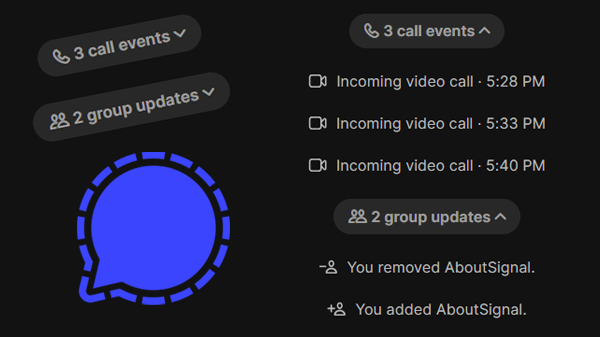
In Signal Desktop, grouped notifications look like this:

By clicking on a notification, you can see all the individual notifications:
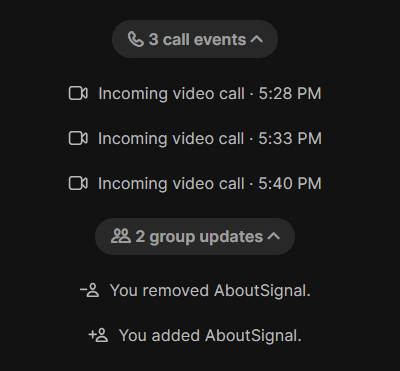
Four types of grouped notifications
As it currently stands, there are four types of grouped notifications: ‘group updates’, ‘chat updates’, ‘call events’, and ‘disappearing message timer changes’.
‘Group updates’ include notifications such as ‘x was added to the group’, ‘x left the group’, changes to group permissions, changes in admins, or updated group names or avatars.
‘Chat updates’ are events in individual chats, such as when someone changes their profile name multiple times in a row.
‘Call events’ include all notifications about calls, such as incoming, outgoing, and missed calls.
‘Disappearing message timer changes’ are notifications that appear when the disappearing messages timer is changed multiple times in a row. In the grouped notification, you can also see the most recently set timer directly, so you don’t have to expand the notification first:
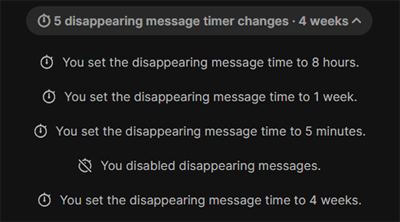
This new feature makes chats much more organized, especially in large, active groups.
Availability
The new feature is now available to testers in Signal Desktop beta 8.6 and in Signal Android beta 8.6.1. Signal has confirmed that the feature will also come to iOS.
It is not yet known when this feature will be available to all users. As soon as there is more news, you will find it on our website and social media.
Stay Informed
Want to stay up to date with the latest Signal news, tips, and updates? Follow us on Bluesky or Mastodon.