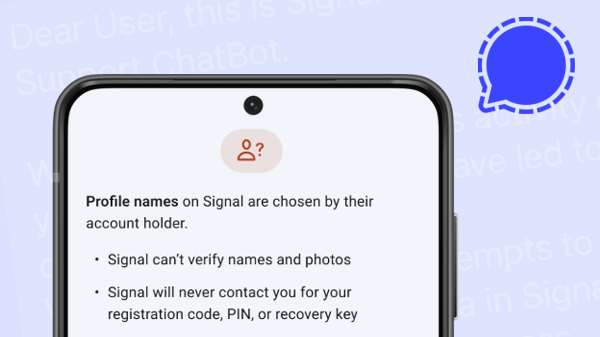
You may have received a phishing message on Signal already that claims to come from Signal’s team and has asked for your verification code. First, these messages are fake so do not reply or share any information. Instead report and block the contact that sent this message in your app.
Messages you send via Signal are end-to-end encrypted. This means that the messages can only be read by you and the recipient. Although Signal has an advanced system to detect spam, the servers cannot check or block the content of messages. So there is a chance that sooner or later you will receive such a phishing message.
In this article we will look at how these phishing attacks work, what you can do to protect yourself on Signal and what to do if an attacker was successful and was able to take over your account.
Inhalt
1. How do phishing attempts on Signal work?
2. What happens if an attacker takes over your account?
3. How can you protect yourself?
1. How do phishing attempts on Signal work?
Two different types of phishing
Phishing attacks are a social engineering technique where attackers try to get sensitive information from their victims by pretending that they are someone else. This sensitive information can be login information, passwords, banking details or in the case of Signal a registration code, a PIN or a recovery key.
It is important to note that such phishing attacks do NOT break Signal’s strong encryption or use any vulnerabilities in Signal’s code. Instead they try to trick users into revealing important information unintentionally.
On Signal there are two different types of phishing attempts:
- Classical scamming attempts where attackers try to manipulate their victims into sending them money, credit card details or other information that is not directly related to Signal.
- Phishing attempts that try to take over a Signal account by getting victims to hand over their registration verification code and optionally their Signal PIN or recovery key as well.
In this article we will focus on the second type of phishing attacks as they are specifically aimed at Signal and require specific precautions and countermeasures as well. For advice on protecting against the first type of general phishing and scamming attempts that you find on all networking apps and platforms you can consult these general guidelines on how to recognize and avoid phishing scams.
How the registration of a Signal account works
But let’s take a closer look at how phishing attacks might try to take over your Signal account. In order to understand that we have to understand how the registration of a new Signal account works in general.
In Signal, you register an account with your phone number. So every Signal account is linked to a certain phone number (note that since at Signal everything is end-to-end encrypted the Signal servers only learn that a phone number is registered but cannot see any message content or who you’re communicating with).
To verify that you actually own and control this phone number you will receive a “verification code” when you are registering at Signal. This verification code will be sent to you via SMS by default but you can also opt to get an automated phone call instead that will read you the verification code.
Here’s what this verification code SMS from Signal looks like:
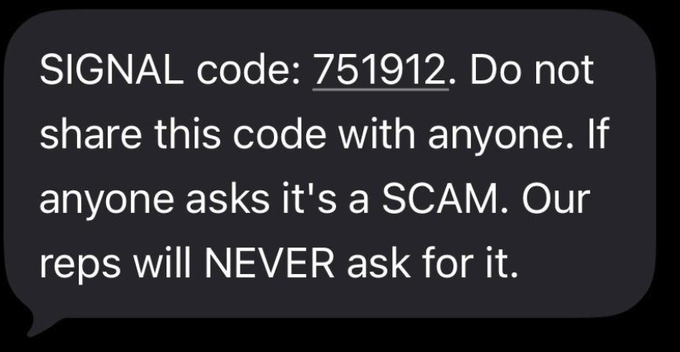
Only after you have entered the correct verification code can you register your new account at Signal, because the fact that you know the verification code proves to Signal that you actually own the phone number that you want to register.
During the registration process you will also be asked to create a Signal PIN. This PIN is used to store your encrypted profile information (contacts, group memberships, settings) at Signal and enable you to recover it if necessary (more on that later). You can come up with a Signal PIN yourself and this can be a numerical or alphanumeric code. Signal does not know this PIN and cannot restore this PIN.
How attackers try to take over your Signal account
Since we now have a good understanding of how the registration process at Signal works we can take a closer look at how phishing attacks that try to take over your account actually work:
First an attacker would take a phone, install the Signal app and start the process to register a new account. But instead of entering their own number the attacker would enter your phone number to register. But in order to complete the registration they need the verification code. And this verification code is sent to your number. So the attacker needs a way to find out the verification code, and they need to do it quickly so the timing doesn’t look suspect.
So that’s why they send out the phishing message to the victim. These messages often claim to come from “Signal Support” or the “Signal Security Chatbot” and they often look something like this (they also might be translated to your native language):
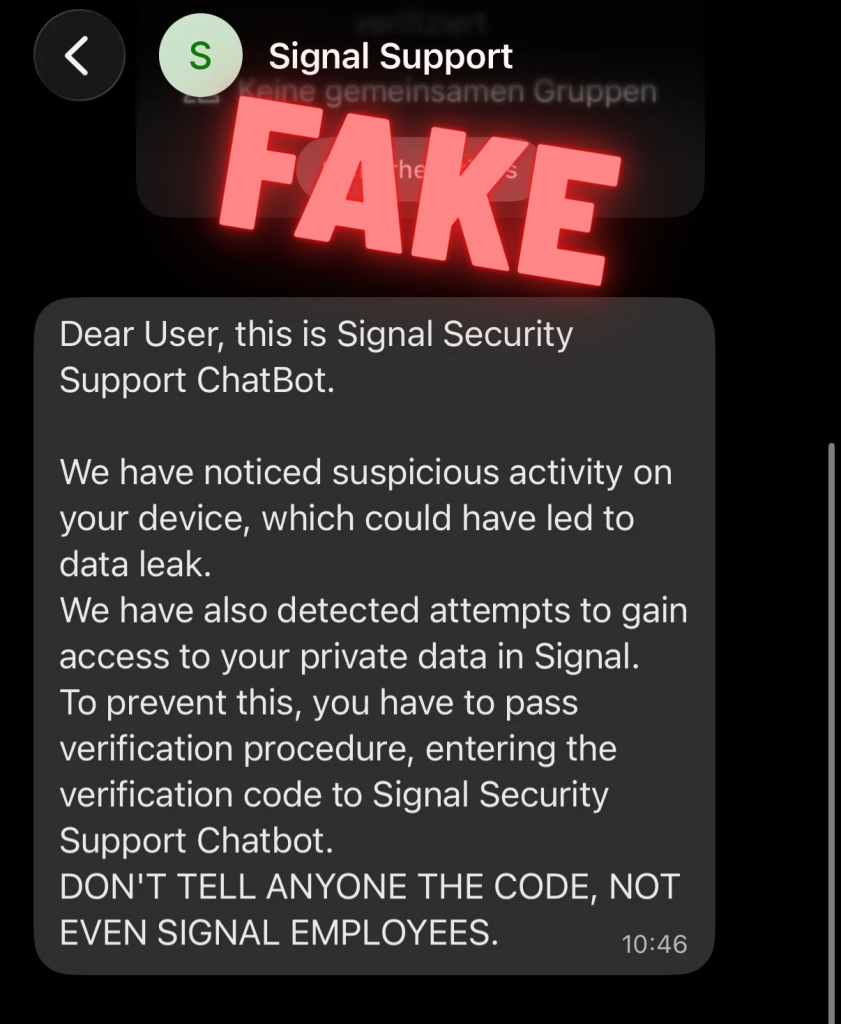
These phishing messages can differ a bit and also look something like this (examples taken from the FBI’s warning website):
“Dear user,
This is Signal Security Support ChatBot.
We have noticed suspicious activity on your device, which could have led to data leak. We have also detected attempts to gain access to your private data on Signal. To prevent this, you have to pass verification procedure, entering the verification code to Signal Security Support ChatBot. DON’T TELL ANYONE THE CODE, NOT EVEN SIGNAL EMPLOYEES.”
“Signal Security Team
Recently, attempts to hack users of our messenger with the connection of third-party devices to the account have become more frequent.
In this regard, Signal updates Terms of Service & Privacy Policy and introduces Mandatory Two-factor Verification for users.
Stay safe and thank you for using the most
secure messenger with end-to-end encryption.”
“Our system has detected a recent login attempt to your account from an unrecognized device or location. As a security measure, we have blocked this attempt and sent a verification code via SMS to your registered phone number.
If this was NOT you:
To secure your account and block this unauthorized access please reply to this message with the verification code you just received.
If this WAS you:
You can safely ignore this message.
The login attempt will be automatically approved shortly.
Thank you for helping us keep your account secure.”
“Dear user,
This is Signal Security Support Chatbot. Another Samsung Galaxy S 10 device is connected to your account.
Location: Drohobych, Lvivska oblast, Ukraine – IP: 178.212.97.211
If it were not you, send: /Cancel”
“Dear user,
We noticed suspicious activity on your device, which have led to data leak. We have also detected attempts to gain access to your private data in Signal. To prevent this, we ask you to pass verification procedure, which will take less than a minute. Please let us know as soon as you are ready. Best regards,
Signal support”
Sometimes these attacks ask you to send your verification code right away, sometimes they want some general reply from you first so the attacker can make sure you’re online and responsive before asking for your verification code.
However the attacks evolve, one thing stays the same: As soon as you send the attacker your verification code that you receive via SMS the attacker has everything they need. They already knew your phone number and entered it during the registration process. But they now also have the verification code associated with this phone number. Signal assumes that the attacker actually owns your phone number (because the attacker has the verification code) and lets them register your phone number.
If it plays out like described, the attacker has been successful. They are now able to take over your Signal account and can start to reach out to other people on Signal and pretend to be you. But there’s good news:
1. The attacker has no access to your old messages and conversations. They also have no access to your profile information or contact list (for more see the next section on Signal PIN). Instead a completely new Signal account associated with your phone number has been created.
2. Since the attacker has registered your account on a new device, the so-called “safety number” of your conversations will change. This safety number is linked to a key on your physical device and it is used to detect Man-in-the-Middle-Angriffe. That means that all your conversation partners will get a small note in their chats that shows that something has changed with your account. This message will be shown in their 1:1 chats with you and also in groups where both of you are members.
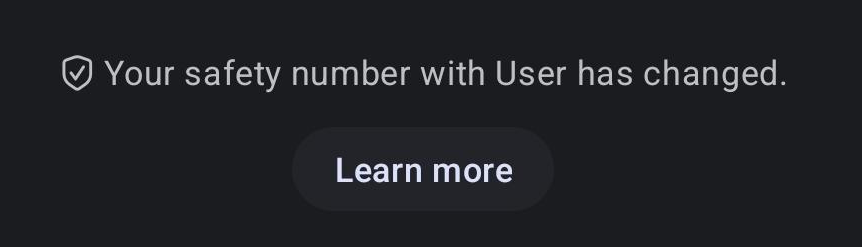
Ideally they will note that change and become a bit suspicious. Even more ideally they will reach out to you on a different channel (say via email or a phone call) and confirm with you that there’s a good reason for this change of your safety number (you lost your old phone for example and got a new one).
What they shouldn’t do is just to ask in your Signal chat if everything is alright. Because since your account is controlled by the attacker now they can just reply that everything is okay and come up with a good excuse. To prevent that, your friends can send a question where they are sure that only you will know the correct answer (“where did we first meet?” or “what’s the name of my dog?”)
3. On your phone you will be logged out of your Signal account immediately and will see a prominent message that you are not registered at Signal anymore reading something like this:
“This device is no longer registered. This is likely because you registered your phone number with Signal on a different device.”
So you will notice this attack very soon and since you still control your phone number you can register your phone number again at Signal, receive a fresh SMS verification code and take back your account quickly. That is unless the attacker has attempted to change the phone number of your account, but we will come back to this in a bit.
In the next section let’s take a closer look at what actually happens when an attacker has been able to take over your account and how different scenarios and settings in Signal work to make it harder for an attacker.
2. What happens if an attacker takes over your account?
The attack scenario we have described in the last section was just the most simple scenario that hasn’t included the role of the Signal PIN yet.
As we have mentioned in our description of the Signal registration process, you are asked to set a numeric or alphanumeric Signal PIN while registering. While you can choose to set no PIN at all (by clicking on the three dot menu during registration) it is a good idea to use the Signal PIN and set a secure PIN while you’re at it. This allows Signal to store your profile information, your contacts list, group memberships, your settings and your block list encrypted on the server and recover it for you when you register your account again.
This means that if you have not set a Signal PIN at all, or an attacker doesn’t know your Signal PIN, they will never be able to access your profile information, group memberships or contact list.
By choosing a Signal PIN you can also activate a powerful protection layer against any phishing attacks by enabling a security setting in Signal that is called “registration lock”. You can enable the registration lock in the settings of your Signal app in the section “Account” (if the option is not available you will have to set a PIN first).
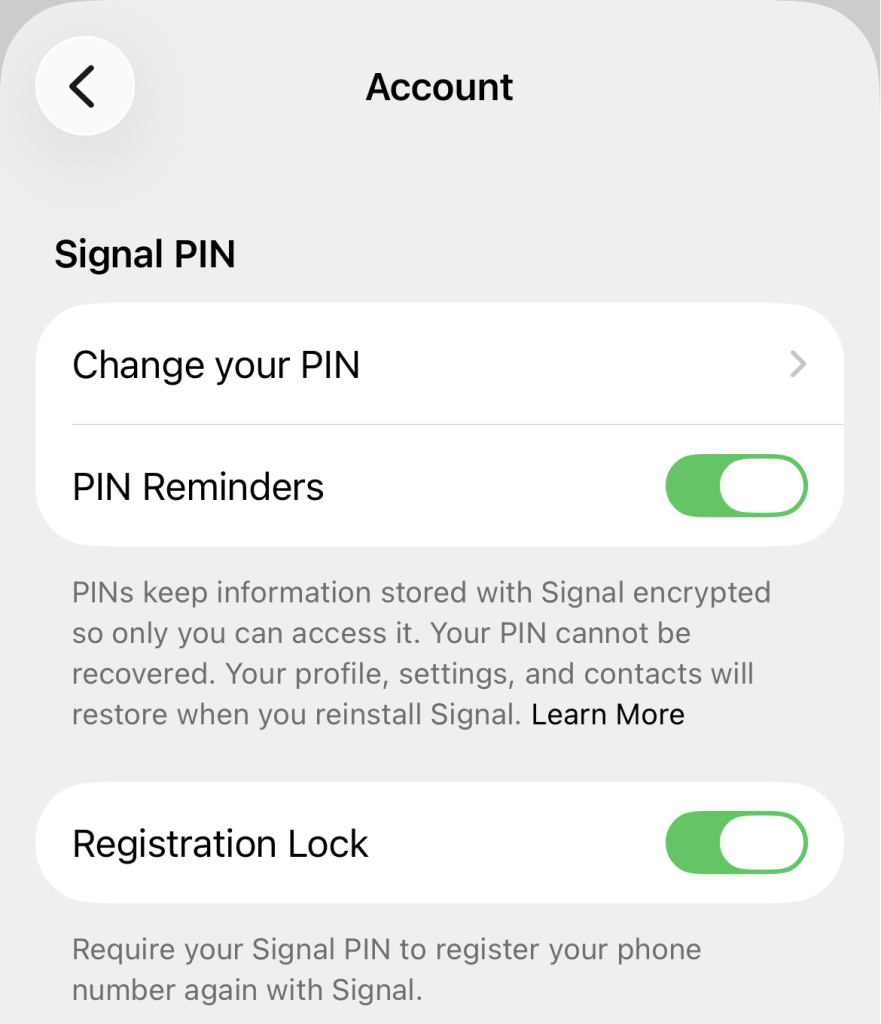
When the registration lock setting is enabled (note that it is not enabled by default) an attacker who wants to register a Signal account with your phone number needs to know two things:
- the verification that is sent to your phone number via SMS
- and the Signal PIN associated with that account
If the attacker only knows the verification code but doesn’t know the Signal PIN they can’t take over that account. Instead the account is de-registered on all devices and a 7-day inactivity timer is started. In these 7 days the owner of the phone number can register again by requesting a new verification code and entering the correct Signal PIN. Since you still have access to your phone number that should be easy to do. If these 7 days pass without any activity anyone with access to the phone number (i.e. a new verification code) can register a new and empty account for that phone number even without knowing the Signal PIN.
Why does the registration lock expire after 7 days?
The fact that the registration lock expires after 7 days might seem confusing at first. Doesn’t that leave an opportunity for an attacker to still take over the account after 7 days? Theoretically yes, but there’s a good reason for this. Since phone numbers are a limited resource and traded by phone providers, you might get a phone number from your phone company that was used by a different person before. Imagine that person used Signal, has set up a Signal PIN and enabled the registration lock. You would never be able to register a new Signal account with the phone number that you now own.
The 7-day expiration timer of the registration lock strikes a reasonable middle ground to cover both scenarios. On the one hand, 7 days are more than enough to re-register your account if an attacker has been able to get your SMS verification code and tries to take over your account. On the other hand it allows for the fact that the new person who tries to create an account with a formerly registered phone number might in fact be the legitimate new owner of that phone number who should be allowed to create a fresh account associated with that phone number. In any case the profile information, group memberships and the contact list of the account will be protected by the Signal PIN and will only be restored if the correct PIN can be provided.
Different scenarios
With that knowledge we can now look at the different scenarios on how attacks play out depending on different initial situations and on what the attackers have been able to obtain:
| Initial Situation: Any Signal account |
| Attacker has: Nothing (no verification code or PIN) |
Result:
|
| Initial Situation: Signal account with no Signal PIN |
| Attacker has: Your verification code |
Result:
|
| Initial Situation: Signal account with PIN but no registration lock enabled |
| Attacker has: Verification code but not your PIN |
Result:
|
| Initial Situation: Signal account with PIN but no registration lock enabled |
| Attacker has: Verification code and your PIN as well |
Result:
|
| Initial Situation: Signal account with PIN and registration lock enabled |
| Attacker has: Verification code but not your PIN |
Result:
|
| Initial Situation: Signal account with PIN and registration lock enabled |
| Attacker has: Verification code and your PIN as well |
Result:
|
Let’s also look at two special scenarios after a successful attack:
Scenario 1: Attacker enabled PIN and registration lock after taking over your account:
Imagine an attacker taking over your Signal account, changing the Signal PIN and after that quickly enabling the registration lock in order to prevent you from reclaiming your account. Well luckily that strategy doesn’t work as long as you still control the phone number associated with your account.
You can still re-register with your phone number and the verification code you receive. Even if the attacker’s registration lock is active they will be logged out immediately. Now both you and the attacker don’t have access to the Signal account associated with that phone number for 7 days. After 7 days the registration lock will expire and now you (as the person who controls the phone number) will be able to start with a fresh account (note that this will trigger a change in your safety number).
In other words, you will have to wait for 7 days to be able to take over your account again and if you haven’t backed up your Signal account using a local backup und Signal Secure Backups you will have to start with a fresh account (because you don’t know the PIN the attacker has set). But that’s a small price to pay and the attacker loses access to the account immediately after you re-register.
Scenario 2: Attacker changed the phone number of the account after taking it over
This scenario is a bit more tricky and makes use of another Signal feature: the ability to change the phone number associated with a Signal account. Of course this is a useful feature for legit use cases where you just got a new phone number but want to keep your old Signal account.
But an attacker can also make use of that feature by quickly changing the phone number associated with your account after successfully taking it over and before you get a chance to re-register again. This will make it impossible for you to take ownership of that account again because you don’t own that new phone number and therefore cannot prove your ownership of the account.
At least some of your contacts will see a warning in their chats with you that the phone number associated with that account has been changed. Similar to the safety number change, this message hopefully will make them suspicious. Unfortunately for privacy reasons this warning message can only be shown to the contacts that already know your phone number. Or more precisely:
- Your contacts will see a notification about your phone number change if they have previously chatted with you AND have your phone number in their phone’s contact list OR if you have selected in your Signal settings that everybody can see your phone number.
- Your contacts will not see a notification if they don’t have your phone number stored in their phone AND you have the setting “who can see my phone number” set to “nobody”. They will also not see a notification if they blocked you as a contact.
3. How can you protect yourself?
In order to protect yourself and your Signal account from these described phishing attempts here are the most important tips to stay safe:
1. Be careful
The most important tip is to be careful when it comes to unrequested messages from groups and contacts that you don’t know (and where you can’t be sure it’s really them).
Here are a few warning signs for such messages that Signal lists on their helpful support page on phishing and scams:
Warning signs:
- Unexpected messages or calls requesting sensitive information, like SMS codes, PIN or passwords.
- Sense of urgency: “Your account will be locked / lost unless..”
- Suspicious links, misspelled addresses.
When you receive such suspicious messages immediately select “Report” in the chat view in Signal and then click on “Report and Block”. And never share your SMS verification code, Signal PIN or backup recovery key with anyone, even if they claim to be from Signal’s team.
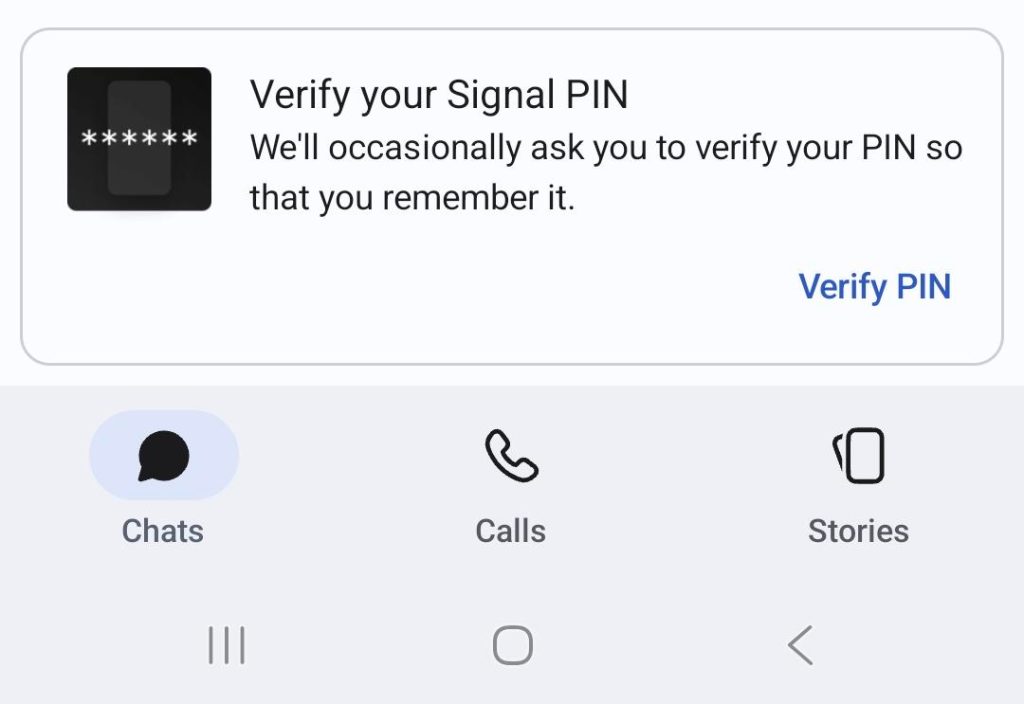
The Signal app will sometimes ask you to verify your PIN code or Recovery key so that you will remember it, but that will always be done in a small pop-up window at the bottom of the app (see below) and NEVER in a chat or call.
2. Enable registration lock
As should be clear now, enabling registration lock is probably the most important setting to defend against phishing attacks. You can enable the registration lock in the settings of your Signal app in the section “Account”.
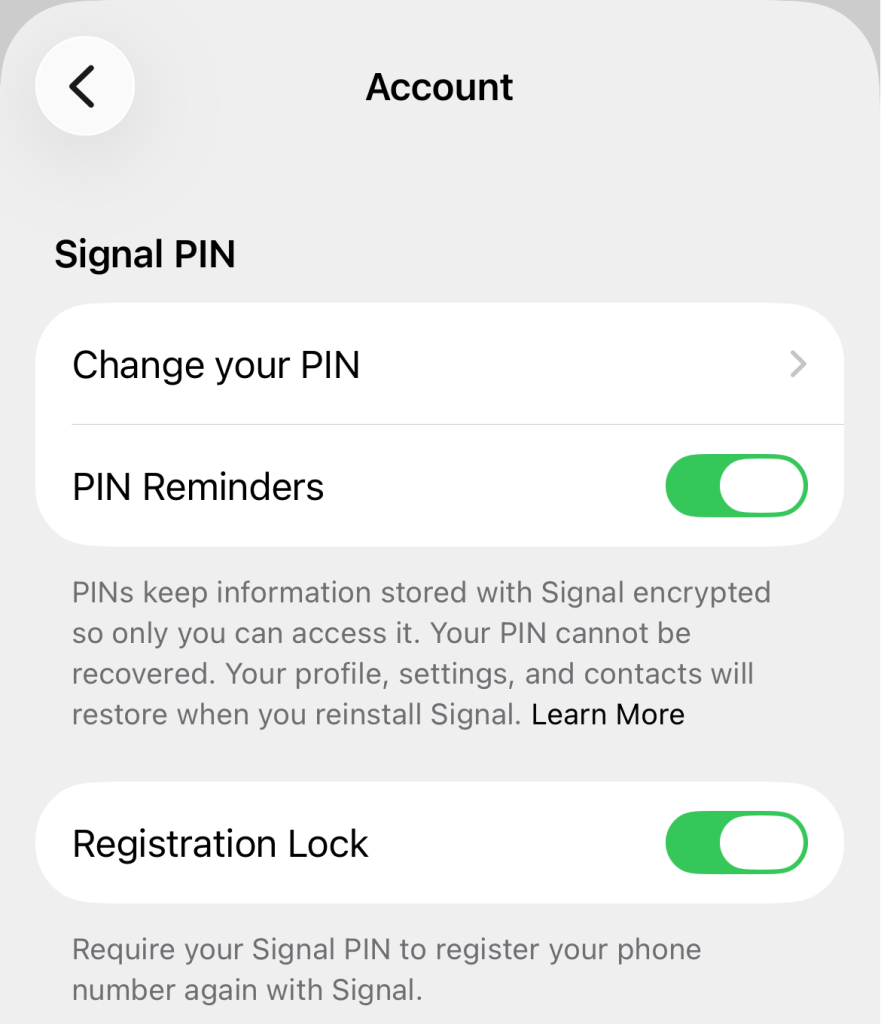
With the registration lock setting enabled an attacker who wants to register a Signal account with your phone number not only needs the SMS verification code from you but also your Signal PIN. So once again: Never share these with anybody.
3. Educate your contacts
Educate your contacts to become suspicious when the safety number or the phone number changes in Signal chats. Tell them to reach out either via a different trusted channel (your personal email address or via a phone call) to confirm that there are good reasons for these changes.
Or if they want to confirm via Signal tell them to verify by asking for a personal detail or shared anecdote that only you could know to make sure that no attacker has taken over your account. Like: “I saw that your safety number has changed. Just to make sure that it’s still you, what’s the name of my favorite Italian restaurant?”
4. Be careful with QR codes and invitation links
Apart from these phishing attacks that try to take over your account by getting your verification code and Signal PIN, be aware that there are other social engineering attacks as well that try to gain access to your Signal account by tricking you into linking new devices and by using fake group invite links. For more details read this blog post and as a general rule remember to be careful with QR codes and invitation links as well.
Note that tricking you into linking adversarial devices to your Signal account is especially dangerous since this might get an attacker access to your chat history. Signal has therefore improved the dialogue to link devices in order to make it harder for an attacker to confuse users but you should stay alert nevertheless.
5. Never share your backup recovery key
If you are using Signal Secure Backups make sure you never ever share the 64 character recovery key with anybody. If an attacker has access to your SMS verification code and your backup recovery key they could get access to your account and all the text messages from the past and (part of) your media as well (depending on whether or not you’re using the free or paid backup plan).
In order to make sure you still have access to your backup recovery key the Signal app will sometimes ask you for the key in a pop-up window in the app but NEVER in a chat.
Zusammenfassung
As every messaging platform Signal is also affected by spam and phishing messages. In order to stay safe on Signal be cautious about unrequested messages and contact requests, never share your verification code, PIN or backup recovery key with anyone and make sure to enable the registration lock in Signal’s settings.
Also make sure to stay up to date with the latest Signal news, tips, and updates by using our RSS feed or by following us on Bluesky und Mastodon.