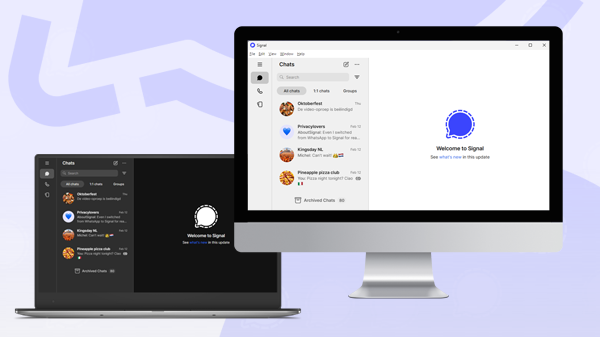
Signal is working on changes that will allow users to set up Signal Desktop as a standalone device, without the need for a mobile phone. In the meantime, Signal Desktop will also get more options so you can use it better as a primary device when it is still linked to your phone. Both changes will significantly improve the user experience of Signal on a computer or laptop.
So far, Signal Desktop has always functioned as a linked device that depends on a mobile phone for the initial setup and managing of several options. This is about to change.
Standalone desktop app
The first indications of the standalone app can be found in the source code of Signal Desktop (GitHub commit 0fb80a2). The updated code makes improvements to the standalone registration flow on Signal Desktop. The feature has not been officially announced, but it’s a work in progress.
This change means that users will soon no longer be forced to use a smartphone (Android or iOS) to communicate securely with their contacts on desktop (Windows, Linux, macOS). Another improvement is that users will no longer need to regularly open or update the mobile app to keep their account active.
To register on Signal Desktop, a phone number will still be required. However, this can be either a mobile number or a landline, including basic mobile phones or dumb phones. This will make Signal accessible to users without a smartphone.
It may also be useful for businesses that use Signal, as it allows everyone to join online meetings on Signal without requiring them to install the app on a smartphone first.
More adjustable options for Signal Desktop
Another commit (GitHub commit 8a49a24) adds options that you previously could only adjust on mobile devices, including generating link previews, using address book photos, and an advanced privacy setting for showing the Sealed sender icon in message details:
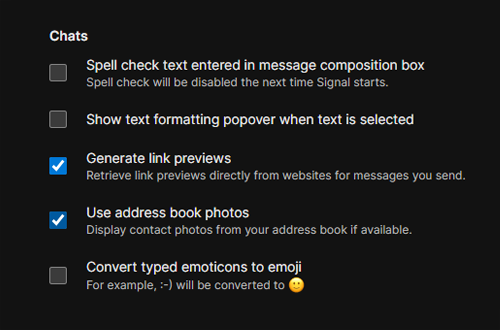
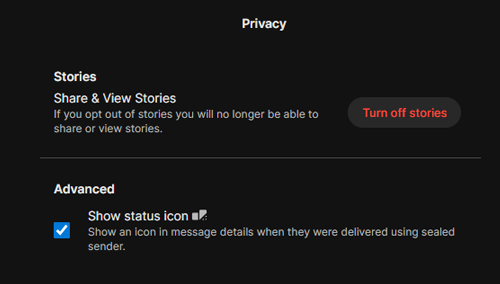
When Signal Desktop is used as a linked device, these new options are synchronized with the mobile app. This allows you to use Signal Desktop more like a primary device.
With all the work in progress, it is clear that Signal is making major improvements to its desktop app. Like everything you send on Signal, all messages remain protected with end-to-end encryption. This ensures that only you and the people you communicate with can read your messages, and not even Signal can access them.
It’s not yet known when the changes to Signal Desktop will be available. As soon as there is more news, you will find it on our website and social media channels.
Informiert bleiben
Möchtest du die neuesten Signal Neuigkeiten, Tipps und Updates erhalten? Folge uns auf Bluesky oder bei Mastodon folgst.