Signal hat eine neue Option für Gruppenanrufe eingeführt. In den neuesten Versionen für Android, iOS und Desktop kannst du nun andere Teilnehmer*innen in Anrufen stummschalten, eine Funktion, die wir bereits früher erwähnt haben Vorschau auf Signal im Jahr 2026.
Wenn du jemanden stummschaltest, kann niemand im Anruf diese Person hören. Das ist beispielsweise nützlich, wenn jemand zu lange spricht, wenn du kurz etwas einwerfen möchtest oder wenn jemand nicht bemerkt, dass das Mikrofon eingeschaltet ist.
In einer früheren Beta-Version konnten nur Administrator*innen andere Teilnehmer*innen stummschalten. Ab sofort können jedoch alle Teilnehmer*innen andere Teilnehmer*innen stummschalten.
Wie schaltest du jemanden in einem Signal-Gruppenanruf stumm?
Um jemanden während eines Anrufs stummzuschalten, halte dessen Video lange gedrückt und wähle im Menü „Audio stummschalten“ aus. In Signal Desktop bewegst du den Mauszeiger über das Video, damit das Menü (Pfeil-nach-unten-Symbol) oben links im Video angezeigt wird, und wählst anschließend „Audio stummschalten“ aus.
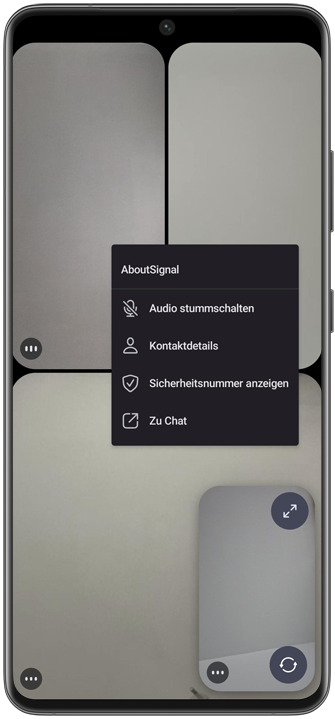
Du kannst jemanden auch über die Teilnehmer*innenliste stummschalten. Tippe in einem Gruppenanruf auf das Info-Symbol oder klicke in Signal Desktop auf die Anzahl der Teilnehmer*innen, um die Teilnehmer*innenliste zu öffnen. Unter Android hältst du anschließend den Namen der Teilnehmer*in lange gedrückt und wählst „Audio stummschalten“ aus. Unter iOS und Desktop tippst beziehungsweise klickst du auf die drei Punkte (…) neben dem Namen der Teilnehmer*in und wählst „Audio stummschalten“ aus.
Wenn eine Teilnehmer*in stummgeschaltet ist, kann sie von niemand anderem im Anruf gehört werden. Die stummgeschaltete Teilnehmer*in kann die Stummschaltung jederzeit selbst aufheben, indem sie auf das Mikrofon-Symbol tippt und das Mikrofon wieder einschaltet.
Verfügbarkeit
Die neue Funktion ist in den neuesten Versionen von Signal für Android verfügbar (8.15), iOS (8.16) und Desktop (8.15).
Informiert bleiben
Möchtest du die neuesten Signal Neuigkeiten, Tipps und Updates erhalten? Folge uns auf Bluesky oder bei Mastodon.