Le richieste di messaggio servono per la tua sicurezza e per impedire che contatti Signal sconosciuti possano chattare o chiamarti direttamente.
In questo articolo, spiegheremo più nel dettaglio le richieste di messaggio. Cosa sono le richieste di messaggio su Signal, come si presentano e cosa bisogna fare quando se ne riceve una?
Che cos’è una richiesta di messaggio su Signal?
Se un utente di Signal con cui non hai mai parlato prima ti invia un messaggio o cerca di chiamarti, riceverai una richiesta di messaggio da parte sua.
È opportuno esaminare attentamente le richieste di messaggio per evitare di entrare in contatto con potenziali truffatori o spammer. La persona che sta cercando di contattarti potrebbe essere qualcuno che conosci, ma potrebbe anche essere un malintenzionato.
Il mittente non può sapere se hai aperto la richiesta di messaggio o se hai letto i messaggi nella chat.
Puoi eliminare, bloccare, segnalare o, se conosci la persona o ti fidi di lei, accettare la richiesta di messaggio.
Che aspetto ha una richiesta di messaggio su Signal?
Una richiesta di messaggio su Signal appare nell'elenco delle chat come mostrato qui:
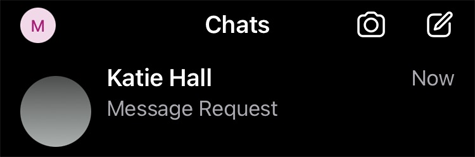
Come mostrato nello screenshot qui sopra, puoi vedere il nome del profilo della persona che sta cercando di contattarti, con la foto del profilo sfocata. Signal sfoca intenzionalmente le foto del profilo per prevenire abusi, come ad esempio qualcuno che utilizza il logo della tua banca o la foto del profilo di un amico per ingannarti. Ricorda che i nomi vengono scelti dai titolari degli account e non sono verificati da Signal, quindi fai attenzione alle truffe d’identità.
Cosa fare quando si riceve una richiesta di messaggio su Signal?
Quando apri la richiesta di messaggio, puoi visualizzarla nella chat.
Puoi leggere i messaggi ricevuti senza che il mittente sappia che li hai letti. Per la tua sicurezza, i link presenti nella chat sono cliccabili solo dopo aver accettato la richiesta di messaggio. Fai attenzione: se qualcuno che non conosci ti invia improvvisamente un link, è probabile che si tratti di spam o di phishing.
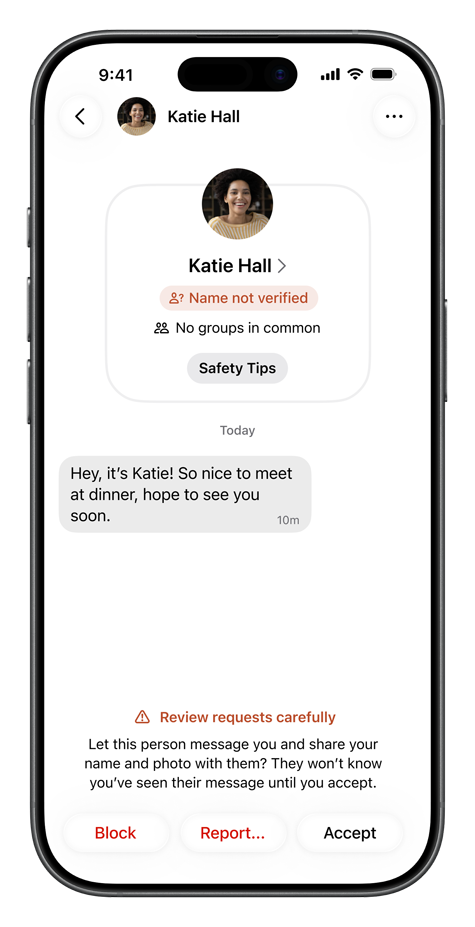
Sotto il nome del profilo nella chat, Signal mostra anche se hai dei gruppi in comune con quella persona. Puoi inoltre rendere visibile l'immagine del profilo toccando “Visualizza”. Tuttavia, fai attenzione perché le immagini del profilo potrebbero essere false.
Se tocchi la voce “Consigli di sicurezza” sotto il nome del profilo nella chat, vedrai vari consigli che possono aiutarti a esaminare in modo sicuro le richieste di messaggio:
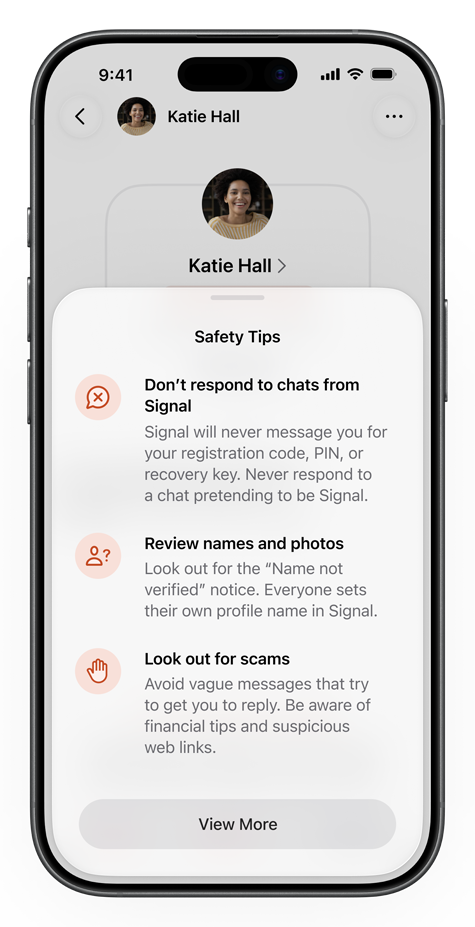
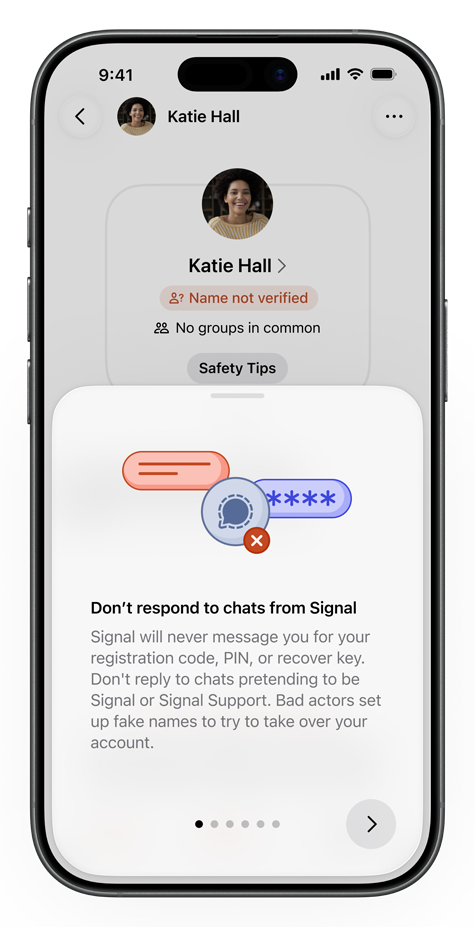
Dopo aver controllato, puoi eliminare, bloccare, segnalare o, se ti fidi della persona, accettare la richiesta di messaggio.
Eliminare una richiesta di messaggio
Se elimini immediatamente la richiesta di messaggio senza aprire la chat, la conversazione verrà rimossa dal tuo dispositivo. Nel caso di una chat di gruppo, uscirai automaticamente anche dal gruppo.
Bloccare una persona o un gruppo in una richiesta di messaggio
Se blocchi una persona in una chat individuale, non riceverai più notifiche da parte sua: né messaggi, né chiamate, né inviti a gruppi. Questa persona non saprà di essere stata bloccata e non saprà che hai letto la richiesta di messaggio o i messaggi nella chat. Gli utenti bloccati non vedranno più nemmeno le modifiche apportate al nome o alla foto del tuo profilo.
Se si tratta di una richiesta di messaggio per un gruppo e blocchi la chat di gruppo, uscirai automaticamente dal gruppo e gli altri membri vedranno che te ne sei andato. Non riceverai più messaggi né aggiornamenti dal gruppo. Gli altri membri del gruppo non vedranno le modifiche apportate al tuo nome o alla tua immagine del profilo. Una volta bloccato un gruppo, non potrai più essere aggiunto ad esso.
Segnalare e bloccare una richiesta di messaggio
Se non conosci quella persona e ritieni che si tratti probabilmente di spam o phishing, puoi anche segnalare quella persona o quel gruppo a Signal. Segnalando una chat, aiuti Signal a combattere lo spam.
Quando si segnala un messaggio, Signal non riceve né il messaggio né altri contenuti della chat che hai segnalato.
Accettare un contatto da una richiesta di messaggio
Se conosci e ti fidi di quella persona e accetti la richiesta di messaggio, questa potrà visualizzare il tuo profilo Signal (nome, foto del profilo e la descrizione “Info”) e inviarti messaggi o chiamarti tramite Signal. Potrà inoltre vedere che hai letto i suoi messaggi, se entrambi avete attivato le conferme di lettura (che sono attive per impostazione predefinita).
Verranno inoltre aggiunti alla tua rubrica su Signal, diventando così un contatto Signal.
Quando accetti una richiesta di messaggio, ti apparirà una finestra pop-up di conferma:
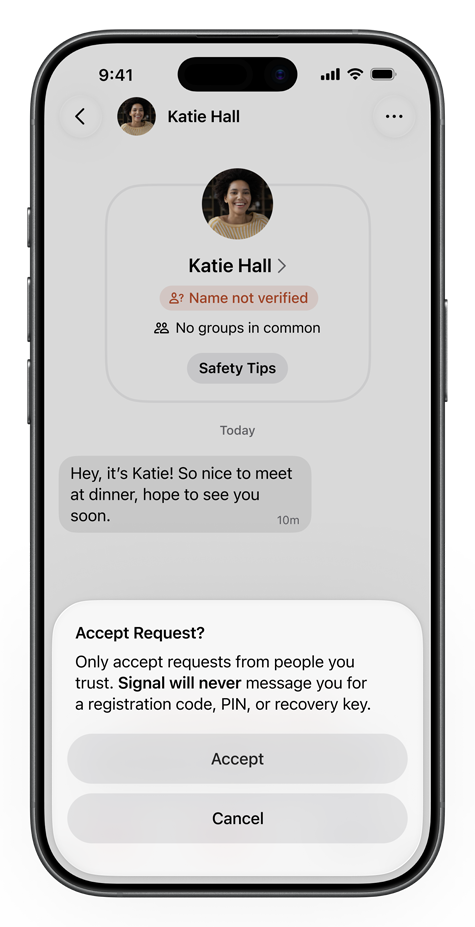
Riepilogo delle richieste di messaggi
Se ricevi una richiesta di messaggio su Signal, non c'è motivo di allarmarsi. Hai semplicemente ricevuto un messaggio o una chiamata da qualcuno con cui non hai mai avuto contatti su Signal.
Potrebbe trattarsi di qualcuno che conosci, ma potrebbe anche essere spam, phishing o un truffatore. Oppure potrebbe essere qualcuno che ha semplicemente digitato il numero sbagliato per errore.
È importante esaminare attentamente le richieste di messaggio e assicurarsi che la persona sia effettivamente chi credi che sia.
In base alla tua valutazione, puoi bloccare, segnalare o accettare la richiesta.
Se sei sicuro che si tratti di una persona con cui vuoi comunicare su Signal, puoi accettare la richiesta di messaggio e aggiungerla ai tuoi contatti su Signal.
Per saperne di più sullo spam e sui tentativi di phishing su Signal, leggi il nostro articolo: Tentativi di phishing su Signal – come funzionano e come proteggersi.