

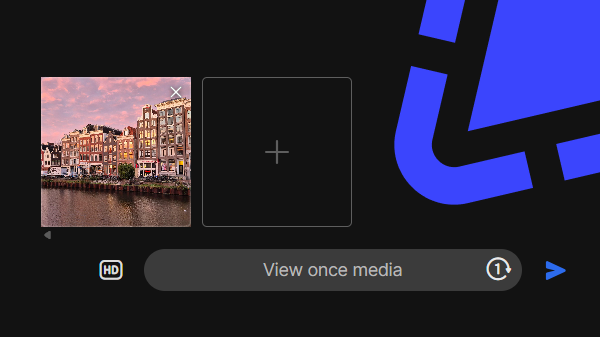
From now on, it is possible to send photos and videos with Signal Desktop that the recipient(s) can view only once. It was already possible to receive such media on Desktop.
At the end of January 2026, we already found the first hints in the source code. The feature is now available in the latest beta version of Signal Desktop (8.2). After a short testing period, the new feature will be rolled out to everyone.
Photos and videos set for view-once are automatically deleted after the recipient(s) have seen them. You also cannot view these sent photos and videos in the chat yourself.
How to send view-once media with Signal Desktop?
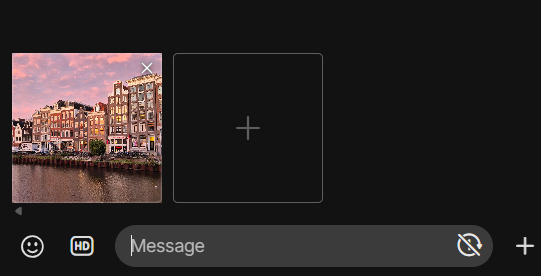
If you add a photo or video as an attachment in Signal Desktop, you will see a new button next to the text input field indicating that the media is not set for one-time viewing:
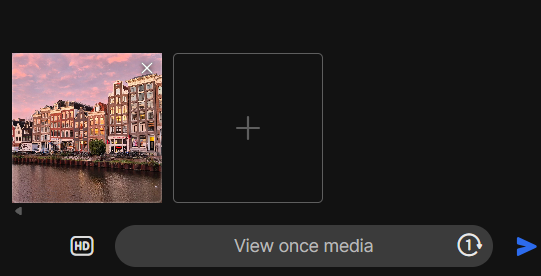
If you click the button, the media will be set for view-once and you can send it immediately:
Keep in mind: while these photos and videos are deleted automatically, recipients could still take screenshots or record them with another device. This means they could potentially view the media indefinitely or share it with others. Therefore, only share photos and videos with people you trust.
Stay Informed
Want to stay up to date with the latest Signal news, tips, and updates? Follow us on Bluesky or Mastodon.
 English
  Deutsch
  Italiano