Updated: November 12, 2026 (updated availability sticker favorites)
Updated: October 30, 2026 (updated availability sticker replies)
Updated: October 14, 2026 (added more details about sticker favorites, removed double tap to send as Signal reverted it)
Good news for sticker lovers: Signal is working on several new features that make stickers more accessible, organized, and easier to use.
Like emoji and GIFs, stickers have become a popular way for users to express themselves in chats and groups. Stickers can add humor, emotion, or a quick reaction without having to type a message.
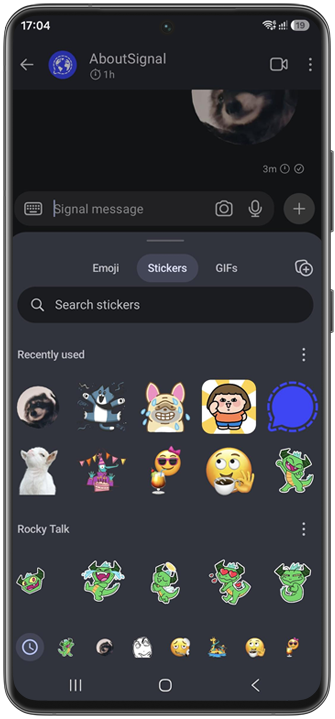
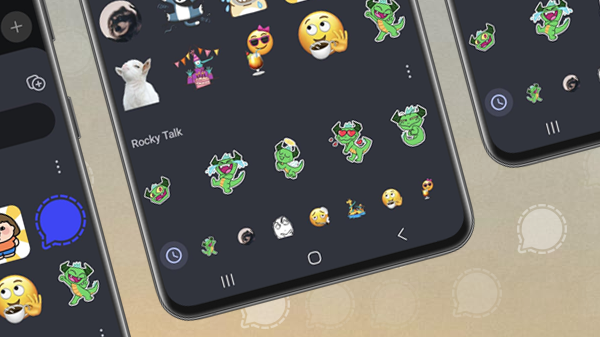
Signal has already introduced a number of recent improvements to the sticker experience across its platforms. On Android, this includes an updated sticker keyboard and improved pack overviews, while Desktop has also received improvements such as pack reordering and updated previews. The same broader improvements are also expected to reach iOS in the near future.
Signal is now working on several additional improvements that will make stickers even more convenient to use. These include favorite stickers, sticker replies, and an option to hide sticker packs from the “Shared with you” list.
Sticker favorites
A feature most sticker users will welcome is the ability to favorite stickers. In the future, stickers can be added to a dedicated favorites section, making it easier to quickly find and reuse the stickers you use most often. This means you won’t have to search through different sticker packs every time you want to use a particular sticker.
The first references to favorites can be found in Signal’s open source code (GitHub commit 257105c), with backups being prepared to include a user’s list of favorite stickers.
Another recent GitHub commit (c754061) reveals more details about sticker favorites. First of all, the new code shows that the maximum number of stickers you can favorite is not just 5 like on Telegram (or more if you pay), but 500 in Signal. If the limit of 500 is exceeded, Signal will reject the newest one, so you’ll first have to remove another favorite.
Adding stickers will be very easy by tapping on a sticker in a chat to open the sticker details and then tapping Add to Favorites (current options are Send and See Pack). It will also be possible via the sticker context menu (long-press on a sticker in the sticker keyboard to open the menu). Removing stickers will work the same way.
Favorite stickers will be sorted by when you added them, with the newest ones at the top. If you want to reorder stickers, you’ll be able to tap Move to Top to make it your top favorite.
If you’ve favorited a sticker whose pack is uninstalled, the sticker remains in your favorites and you can still use it.
Your favorite stickers will be synced across any linked devices. Favorites are only visible to you, meaning others cannot see when you favorite a sticker from a chat.
Last but not least, your favorite stickers are end-to-end encrypted, just like everything you send and receive on Signal.
Update 11/12/2026: Sticker favorites are available in Signal for Android 8.36, Signal for iOS 8.38 and Signal Dekstop 8.36.
Sticker replies
Another useful addition coming to Signal soon is sticker replies. This feature will allow you to reply to specific messages with a sticker. Instead of sending a sticker as a separate message, you will be able to attach it directly to the message you are responding to, just like a normal quoted reply.
As we reported in July, the feature was already in development for Android (GitHub commit 7d6a31b) and Signal Desktop (GitHub commit 9da5342). On iOS, Signal already had support for receiving sticker replies (GitHub commit f7692b6). More recently, the iOS developers also added code for sending sticker replies (GitHub commit f5c7d76), suggesting that the feature is moving closer to a wider rollout across platforms.
Update 10/30/2026: Sticker replies are available in Signal for Android 8.34, Signal for iOS 8.36 and Signal Dekstop 8.34.
Hide sticker packs
When you receive stickers on Signal, the app shows the associated sticker pack in the “Shared with you” section. While this can make it easier to discover new sticker packs, not everyone wants every shared pack to appear there.
Signal is working on an option that will allow users to hide sticker packs from the “Shared with you” section. This will give you more control over which sticker packs are displayed, helping keep the sticker interface cleaner and the sticker pack overview more organized.
The first references to support for hidden sticker packs can be found in Signal’s open-source code (GitHub commit 257105c). The release notes mention support for hidden sticker packs, while the accompanying changes introduce separate InstalledStickerPack and HiddenStickerPack types for inclusion in backups.
Availability
Sticker favorites and sticker replies have been added in the latest versions. Hiding sticker packs is still under development, and it’s not yet known when they will become available.
As always, as soon as there’s more news, you will find it on our website and social media.
Stay Informed
Want to stay up to date with the latest Signal news, tips, and updates? Follow us on Bluesky or Mastodon.