
A closer look at the experimental features being tested in Signal Labs.



Startseite > Signal Security & Privacy Guide
Why is Signal so secure? A complete guide to Signal’s encryption, metadata protection, and privacy features
Signal’s encryption
Key generation and key exchange in Signal
Encrypted message exchange in Signal using the “Double Ratchet Algorithm”
Post-Quantum Cryptography
Protection of Meta Data
Phone Number Privacy and Usernames
How Signal makes sure it doesn’t know your Contacts
Sealed Sender
Link previews and private GIF search
Other Security Features
Signal Backups
Safety Numbers
Signal PIN
Registrierungssperre
Censorship circumvention
Relayed calls
Screen Lock and Screen Security
Verschwindende Nachrichten
View once media
Incognito Keyboard
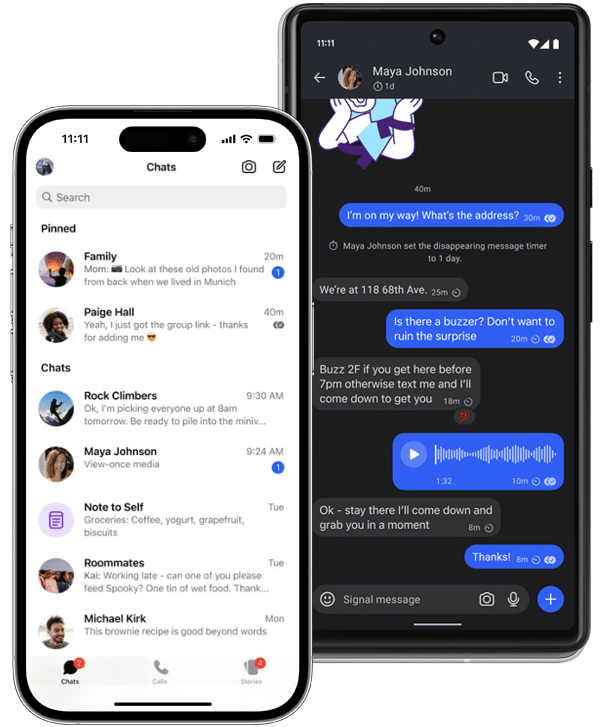
Signal is widely regarded as the most secure messenger among the most common instant messaging apps and is recommended by security experts worldwide. Signal is used in scenarios where the highest level of security is essential, by civil rights activists, investigative journalists and government officials but also by normal users who just want to protect the privacy of the messages they share with friends and their family.
Today we want to answer the question: Why is Signal so secure and how do the different security mechanisms that Signal offers work exactly? While we will dive in some technical details you don’t need any technical expertise to understand the key points of this article.
TLDR;
When it comes to security the most prominent feature of Signal is its encryption and the fact that the app encrypts everything that is communicated via Signal. In this section we will be taking a very detailed looked at how Signal’s encryption works and why it is so secure.
First, it’s important to understand what encryption is. Encryption refers to the process of converting a normal, readable message into a coded format, also known as ciphertext. For example, “Hello” might become something like “kV1237Be391gx1asd1PaMP3kdUrPQ==”. As you can see, an encrypted message is unreadable to humans and can only be deciphered using mathematics and a so-called key.
Signal is using end-to-end encryption for all the communication that is taking place on Signal. Put most simply, end-to-end encryption means that the communication is securely encrypted and can only be decrypted by the sender or the receiver of a message.
With end-to-end encryption, the encryption and decryption happens entirely on your own device and the device of the recipient. Only you and the recipient have the keys. No one else can read, hear, or see the contents of your messages. And everything you exchange is encrypted on Signal — text messages, voice messages, stories, photos, videos, stickers, documents, calls, and video calls.
In Signal, all these things you send or receive are encrypted with end-to-end encryption by default. But even other elements, such as group names, group permissions, profile pictures, and profile names, are end-to-end encrypted and thereby protected in Signal.
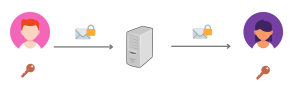
End-to-end encryption: The message stays encrypted the whole time.
Other software products sometimes claim to offer “encryption” as well, but what they mean by that is often just “transport encryption” (or “client-server encryption”). This way a message is encrypted during transmission to a server but decrypted there and then encrypted again when it’s forwarded to the receiver.
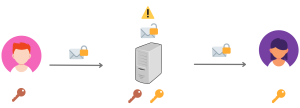
Transport encryption: Message gets decrypted and re-encrypted at server.
Obviously, whoever controls the server (often the company selling the software/service) can read all the messages.
For end-to-end encryption this is not the case. Only the sender and the receiver know the secret key that is needed to decrypt the message. Which leads us to the obvious question: How can both the sender and receiver both know a shared secret key to encrypt and decrypt their messages and hide this secret key from everyone else?
Luckily there is a very elegant solution for that problem. It’s called “Diffie-Hellman key exchange” and is used by Signal to achieve exactly that.
The “Diffie-Hellman key exchange” solves a crucial problem of encrypted communication. How can two (or more) parties who want to communicate securely agree on a shared key or password to encrypt their communication without anybody else knowing what the encryption key is? Sure, if they live in the same city they can meet at a secluded place and whisper the encryption key in each other ears without anybody else listening in. While such a scenario is not very realistic and practical it’s still theoretically possible.
But how can the same thing be accomplished when you and your communication partner live in different places and have to agree on a shared encryption key via the internet? This is were the “Diffie-Hellman key exchange” becomes important. Its basic idea is both simple and mind-blowing:
Both communication partners create a pair of keys that are mathematically related. One is the private key that is secret and is only known to the owner (for Signal it is securely stored on your device only). The other one is the public key, that you send to your communication partner and which is not secret at all. In the case of Signal it’s stored on Signal’s servers where people who want to get in touch with you securely can download it even if you’re not online.
Now comes the fun part: If your communication partner takes your public key and encrypts a message with it, the only way to decrypt it again is by using your secret private key. So your communication partner can start having an encrypted conversation right away that can’t be read by anyone else. And if you want to reply you encrypt your message with the public key of your communication partner and it can only be decrypted with their private key.
How is that possible you might ask? The mathematical background is quite complex and employs what is known as “One-way functions”. These are mathematical calculations that are very easy to do in one direction but very hard when you want to go in the opposite direction (or want to revert the calculation). Multiplications for example are quite easy in one direction (13 x 27 = 351) but very hard to reverse (if I tell you to find all factors for 351 it will take considerably longer than the multiplication step because you also have to find 3 × 117 = 351 or 9 × 39 = 351).
Public-private keys employs such mathematical problems with much much bigger numbers (more precisely, Signal uses huge elliptic curves) that make these keys virtually impossible to break.
Signal uses the genius of the Diffie-Hellman key exchange to establish an encrypted and secure communication channel between two or more users. The way Signal does it is called the “X3DH Key Agreement Protocol” where X3DH stands for “Extended Triple Diffie-Hellman” and you can learn all about the details here. It’s called “Extended” and “Triple” because Signal uses multiple Diffie-Hellman operations among a number of private-public key pairs (see technical details below) but the principles are the same as for a simple single key exchange.
Let’s see how this works out in practice. When you register at Signal the Signal client at your phone creates a set of different private and public keys. While the private keys are securely stored on your phone the public keys are uploaded to Signal’s server. Let’s say one of your friends now wants to send you a message. His Signal app then just contacts Signal’s server and automatically downloads the public keys associated with your account (finding you either via phone number or username). With these public keys and his own private keys your friend’s Signal app creates a secret key that is mathematically based on the keys of both of you but not known to anyone else. His Signal app encrypts the first message to you with this secret key and sends it to you, together with his own public keys and some information to verify his identity (see the section on Signal’s safety number).
When your Signal app receives this message it has all it needs to decrypt it. It has your private keys already and now has the public keys of your friend as well. With these the app calculates the secret key and can decrypt the message.
But using the same secret key to encrypt all messages between you and your friend would be a bad idea. Even if this secret key is very very very hard to break Signal doesn’t want to take that chance and therefore constantly changes this secret key. It does so by using a “double ratchet algorithm” as will be explained in the next section.
It is important to note that Signal’s server can’t mess with this process and cannot break or weaken this encryption. As has been described in the section on end-to-end encryption the encryption and decryption takes place at the phones of you and your friend, the server is just a connector and enabler of this process, that makes sure everything works even if you or your friend are offline for a while (in which case the server stores any encrypted messages for you and forwards them to you when you are back online).
Those of you interested in the technical details of the X3DH Key Agreement Protocol protocol can find the full specification at https://signal.org/docs/specifications/x3dh/ If you want to look at the code then check out https://github.com/signalapp/libsignal
Here’s a brief overview of how it exactly works.
When you install Signal your app creates the following Diffie-Hellman keypairs for you, using the elliptic curve Curve25519.
If your friend wants to get in touch with you he downloads these public keys from Signal’s server and verifies the prekey signature. Afterwards he uses two of his own keys, namely his own identity key IKA and an ephemeral key EKA and performs four Diffie-Hellman calculations with these keys, as shown in the graphic below (the fourth calculation is optional, in case there are no one-time prekeys available at that time).
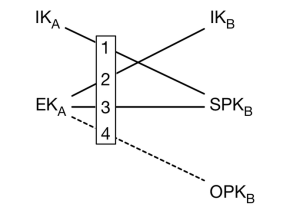
The output of these four Diffie-Hellman calculations is run through a Key Derivation Function (KDF) to generate the secret key SK:
SK = KDF(DH1 || DH2 || DH3 || DH4)
Your friend also calculates an “associated data” AD based on your two identity keys that is used for safety numbers (TODO Link):
AD = Encode(IKA) || Encode(IKB)
Your friend then encrypts a first message with the secret key SK and sends it to you together with his public identity key IKA, the public ephemeral key EKA and with identifiers stating which of your prekeys were used. When you receive that bundle your Signal app has all it needs to decrypt the first message and starts a secure communication with your friend. After that the “double ratchet algorithm” steps in and constantly changes the involved keys (except for the identity keys which are stable) and deletes old keys that are not used anymore to provide “forward secrecy”.
You might have heard the term “double ratchet” when it comes to the encryption developed and used by Signal. And essentially this double ratchet mechanism is the real innovation of Signal’s encryption that has made it the gold standard for end-to-end encryption.
What it provides to Signal’s encryption are two important properties:
Signal uses state-of-the art encryption techniques (such as Elliptic Curve Diffie-Hellman, AES, Post-Quantum Cryptography, …) that make it virtually impossible to even break the key for one message. But by introducing two “ratchet mechanisms” Signal has made any attempt to break the key for one message futile because it constantly changes the keys that are used for the encryption of messages. And like a “ratchet” that constantly changes its position but cannot be turned back again it is impossible to retrieve any encryption keys from the past or in the future. Let’s look at these two ratchets in more details.
We have seen that when you register at Signal a set of encryption key pairs are automatically created for you. Each of these key pairs consists of a private and a public key. While the private key remains secret and is securely stored on your phone (and only there) the public key is shared with your communication partners to encrypt the messages to you and confirm your identity.
When somebody starts communicating with you on Signal the first thing that happens automatically is that the Signal client of this person downloads a key bundle of your public keys from Signal’s servers. With your public keys and their own private key your communication partner generates a secret encryption key that is based on both your secret private keys. He encrypts the first message with this key and sends the encrypted message to you, together with his own public keys.
Your Signal client receives the message and based on the public keys of your communication partner and your own secret private key arrives at the same shared encryption key that allows to decrypt that message.
For the next message your Signal app automatically creates a new set of public keys, encrypts the new message with that keys and sends the message together with the new public keys to your communication partner. At the same time, old keys are immediately deleted so they cannot be fetched by any attackers.
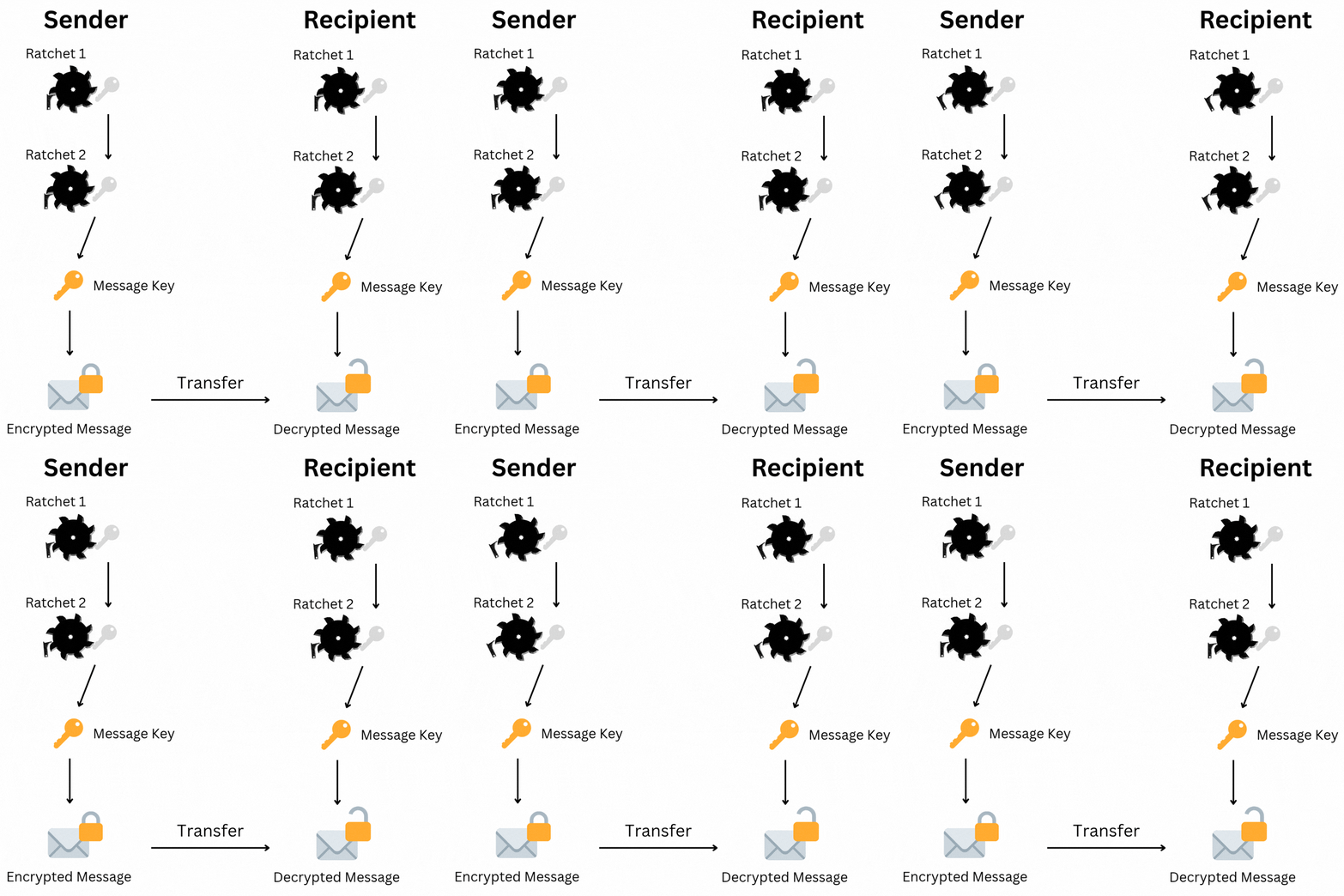
Signal’s double ratchet algorithm
While you and your communication partners are now sending back and forth messages (this can also include media files) two ratchets are constantly moved so that the keys used for encryption are changing and cannot be restored by an attacker.
This is why the Signal protocol has initially been called the Axolotl protocol. The Axolotol is a salamander that is famous for its self-healing capacities and just like an Axolotl the Signal protocol has impressive self-healing capabilities. Even if an attacker cracks the key for one message (which is almost impossible on its own) he can only read one message with this key, all the other messages remain protected by the different keys and the ever-moving ratchets of the algorithm.
The description above is a bit of a simplication to get a better understanding of the general principles. The technical details of the double ratchet algorithm are more complex and you can read them in full length at https://signal.org/docs/specifications/doubleratchet/ If you want to look at the code then check out https://github.com/signalapp/libsignal
Here’s a brief summary of the technical key aspects:
The double ratchet algorithm of the Signal protocol uses Key Derivative Functions (KDF) at its core. Basically a KDF takes a secret and random input key and produces a different secret key based on this input.
The symmetric-key ratchet uses a chain of these KDFs that creates a new message key for each message and moves one step forward in this chain/ratchet for each message (see graphic below).
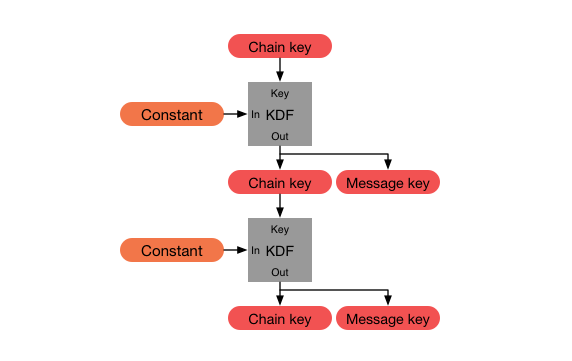
This ratchet alone provides forward secrecy as an attacker can’t go back in time and derive chain keys and message keys from previous steps. It does not provide post-compromise security though since an attacker could derive any keys in the future from a key they break.
This is were the second ratchet, the Diffie-Hellman ratchet, enters the picture. This Diffie-Hellman ratchet puts variation on the orange element labeled as “Constant” in the graphic above and changes it for each step by creating new pairs of private and public keys and performs Diffie-Hellman calculations with these new pairs of keys.
Taken together these two ratchets organize three different chains on each Signal client.
(1) A root chain from which keys for the sending and receiving chains are created.
(2) A sending chain for encrypting and sending messages to another user.
(3) A receiving chain for receiving and decrypting messages from another user.
These chains have to be synchronized among two (or more) users in order to enable the correct encryption and decryption on both sides. In other words: If the users Bob and Alice want to communicate, the sending chain of Bob has to be at the same position as the receiving chain of Alice and the sending chain of Alice has to be synchronized with Bob’s receiving chain.
The whole process of both ratchets at work on one Signal client looks as the graphic below. The Diffie-Hellman ratchet moves constantly and renews Diffie-Hellman keys that provide the input for the ever-moving symmetric-key ratchet that creates new message keys via a Key Derivation Function.
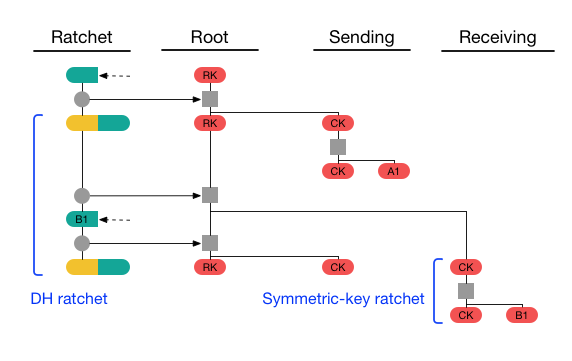
While the process itself can become quite complex with many messages being sent back and forth it is crucial that the different keys are the same state at both devices and are matched to the correct message in order to decrypt it. The beauty of this design is that it even works if messages are being delivered late or not in the correct order. Since every message key is linked to a certain message even out-of-order messages will be handled correctly since the Signal protocol keeps track of the different keys and only deletes keys if they have been used.
In the section on “Key generation and key exchange” we have talked about how one-way functions or other mathematical problems are easy to solve in one direction but hard to solve in the other direction. Using these problems to calculate secure keys is a cornerstone of public-key cryptography as it is used by Signal and many other software.
There is one challenge though. While such one-way functions might be hard or almost impossible to reverse by our traditional computers they might be very easy and fast to reverse by a new type of computer: quantum computers. Quantum computers work fundamentally different to the computers that now exist and this might enable them to solve the mathematical problems on which public key cryptography relies upon much faster. Although such quantum computers don’t exist so far they might exist in the near future and attackers might then be able to crack large amounts of data that have been encrypted by traditional cryptography.
Signal has taken this risk very seriously and was the first major messenger that introduced “post-quantum cryptography” in its encryption technologies already in September 2023. Post-quantum cryptography are algorithms and techniques that are regarded as largely immune to possible attacks by quantum computers. So in other words, what Signal did was adding a new layer of protection to its encryption that would make it impossible for potential quantum computers to break Signal’s encryption. This feature has been quickly rolled out to all Signal clients in 2023 and new post-quantum cryptography has been introduced in autumn 2025 to protect against additional threats.
It is important to note that Signal has not replaced its robust and well-tested traditional encryption with post-quantum cryptography. Instead it has simply added another quantum-safe encryption layer on top of it, providing security even if one layer fail.
If you want to learn more about Signal’s Post Quantum cryptography check out the specifications and the blog post on this topic (https://signal.org/blog/pqxdh/ und https://signal.org/docs/specifications/pqxdh/). Here is a brief technical summary:
To harden the Signal protocol against quantum computer attacks Signal replaced the X3DH key agreement protocol with a post-quantum version called PQXDH („Post-Quantum Extended Diffie-Hellman”). It works very similar to the traditional X3DH approach and still relies on elliptic curves for its calculations. But on top of this PQXDH adds Crystals-Kyber (now known as ML-KEM) as a key encapsulation mechanism (KEM).
What PQXDH protects against is what has been called “harvest now decrypt later” attacks where attackers store encrypted data now and hope to be able to decrypt it in the future with quantum computers.
In October 2025 Signal announced the next step of making its encryption quantum secure by introducing the Sparse Post Quantum Ratchet (SPQR). SPQR upgraded the existing Double Ratchet mechanism into a new Triple Ratchet that included an additional quantum safe approach to guarantee Forward Secrecy and Post-Compromise Security as well.
Signal continues to work in this area and will improve the Signal protocol against future challenges as the field of post quantum cryptography further progresses. You can find two relevant papers to which Signal has contributed hier und hier. We have also reported on the latest developments from the Real World Crypto Symposium 2026 and will continue to post about this topic in our news section.
So far we have mainly talked about the encryption of messages that you and your friends or colleagues send back and forth via Signal. But what really sets Signal apart in terms of privacy and security is the fact that it additionally encrypts all kinds of meta data.
Not only does Signal encrypt the content of all of your communication such as messages, files, voices messages as well as voice and video calls. But Signal also encrypts the following information that is created when you communicate with other people:
For a comprehensive overview of this protection and why Signal offers greater security than any other popular messenger see our comparison table at https://privacyapps.nl/signal-app-comparison/
In the end Signal only knows two things about its users: Whether a phone number has been registered at Signal (and when it was registered) and the last day this account connected to Signal servers. That’s all. Signal doesn’t and can’t know who you are, what you send and receive or who you communicate with. In the following sections we will explore some of these aspects in more detail and explain the technical background.
Phone number privacy is an important feature that Signal introduced in February 2024. Since then Signal hides your phone number from other Signal users by default. The only exception are people who have your phone number already saved in their phone’s contact list. They will still see your phone number since they already know it anyway.
This feature is especially valuable in groups where all other group members would see your phone number otherwise and could use it for malicious purposes such as phishing attacks. If you don’t like that protection you can got to the privacy settings in the Signal app and change your setting so that your phone number is visible to all Signal contacts again. More details on this process can be found on Signal’s support page.
Signal introduced usernames as part of the phone number privacy feature to offer its users a new way to connect. If you want to offer other users a way to reach you without sending them your phone number you can just create a username in Signal that consists of a string and a number and might look something like “signaluser.03”. Since Signal does not provide a searchable directory of usernames, only people who have your exact unique username will be able to start a conversation with you. You can share your username directly or create a QR code that people can scan in order to get in touch with you via your username.
It is important to note that usernames are not similar to how usernames are used in many social networks. In Signal your username is not displayed in your profile and people you message can’t see or find your username if you don’t share it with them.
Usernames are therefore more a shortlink to let people contact you without revealing your phone number. You can also change your username at anytime which will automatically delete your old username and delink it from your profile.
As Signal has noted, “usernames in Signal are protected using a custom Ristretto 25519 hashing algorithm and zero-knowledge proofs. Signal can’t easily see or produce the username if given the phone number of a Signal account. Note that if provided with the plaintext of a username known to be in use, Signal can connect that username to the Signal account that the username is currently associated with. However, once a username has been changed or deleted, it can no longer be associated with a Signal account.” (https://signal.org/blog/phone-number-privacy-usernames/)
But with Signal you cannot only hide your phone number in conversations. Signal has also added a setting to let you control who can find you how on Signal. If you go to the privacy settings of Signal you can choose that nobody can find you based on your phone number in Signal. If you enable this optional privacy setting this means that unless people have your exact unique username, they won’t be able to start a chat with you. They also will not know that you have a Signal account – even if they have your phone number. People you’re chatting with on Signal won’t see your phone number as part of your profile page – this is true even if your number is saved in their phone’s contacts.
A prime example of how committed Signal is to the privacy and security of its users and still wants to combine them with the best and easiest user experience is the way your contacts are handled by Signal. First and foremost: Signal doesn’t know who your contacts are. In other words, Signal doesn’t know who is in your contact list and has no idea who you’re communicating with.
Yet Signal allows you to find your friends easily on Signal and even can restore your contact list when you reinstall the app. How is that possible when your contact list is completely hidden from Signal? Signal uses two security innovations to make this happen which are known as “private contact discovery” and “secure value recovery”. We’ll briefly go through these two concepts, how they work and will talk about a few technical details.
When you install Signal, you probably want to know which of your contacts also uses Signal so you can message them via Signal right away. Signal enables this process through a very innovative feature called Private Kontakterkennung. It was specially developed by Signal for this purpose and has two layers of security to prevent Signal from learning about your contacts.
First, your contacts’ phone numbers are encrypted as a so-called “hashes”. However, this encryption alone does not provide sufficient protection, as the number of possible phone numbers is very limited so an attacker could break a hash fairly easily. Therefore, Signal processes this encrypted data exclusively in a separate and specially secured area of Intel processors (a so-called SGX-Enklaveum zu überprüfen, ob deine Kontakte auch bei Signal sind.
Signal’s servers can’t see what is happening inside these enclaves and Signal has taken a great effort to protect against potential side-channel attacks by obscuring memory access patterns among other things.
Signal hat einen ausführlichen Blogeintrag that transparently describes this process. Here’s a summary of the essential process from this blog post:
In other words, your contact lists is being processed encrypted in an isolated and secured part of Signal’s server that can not be accessed even by people with physical access to the servers. This allows you to quickly learn which one of your phone contacts is using Signal already while not compromising on security and privacy. And if that’s not enough for you, you can also run Signal without giving it any access to your contacts at all.
For a long time, Signal had no interest in backing up your contact list. After all, Signal solely relied on phone numbers as a contact method in the past so your contacts were always stored in your smartphone’s address book. However, this led to the criticism that your phone number was exposed to other users.
As we have seen Signal responded by introducing phone number privacy and usernames in 2023 which allows you to contact users based on their username while keeping the phone numbers hidden. This creates a problem however: These username contacts are not saved in your phone’s address book so Signal now has to take care of the backup of these contacts (in case your phone is accidentally destroyed and you want to restore your contacts for example).
Zu diesem Zweck führte Signal das Prinzip der Secure Value Recovery (Sichere Wertwiederherstellung). Wie Signal-Gründer Moxie Marlinspike erklärte::
The purpose of this work [on Secure Value Recover] is to enable non-phone number based addressing, at which point Signal will have to manage your contacts rather than your address book.
This is how it works: If I allow it, Signal backs up my contacts using Secure Value Recovery and uses two layers of security so that Signal cannot access my contact data. Firstly, the data is encrypted with a PIN that the Signal user can choose (four digits minimum but can also be longer and include letters and special characters to improve security). Secondly, the encryption takes place in a secure SGX enclave that we have already encountered in private contact discovery.
Dieser ausgezeichnete deutsche Artikel bei Golem beschreibt den Vorgang im Detail:
Bei SVR [Secure Value Recovery] wird die SGX-Enklave hingegen zur Verwaltung der Schlüssel verwendet, mit der die Kontaktlisten verschlüsselt werden. Für jede Signal-Installation wird ein zufälliger 256-Bit-Schlüssel gemeinsam mit einem Hash-Wert der Signal-PIN hinterlegt. Der Schlüssel kann durch Vorweisen des Hashes der Signal-PIN aus der SGX-Enklave heruntergeladen werden. Gemeinsam mit der Signal-PIN wird dann der Schlüssel gebildet, mit der die Kontaktliste verschlüsselt wurde. So bleiben die Kontakte auch nach einem Verlust des Smartphones erhalten, sofern die Signal-PIN korrekt eingegeben wurde.
Gleichzeitig bietet die Technik einen Brute-Force-Schutz, da aus der Signal-PIN alleine nicht der Schlüssel reproduziert werden kann, weil der Schlüsselteil aus der SGX-Enklave fehlt.
Beide möglichen Szenarien, wo Signal Zugriff auf die eigene Kontaktliste braucht, sind also sehr gut abgesichert, sodass Signal nie deine Kontakte sieht. In Szenario 1 (Welche meiner Kontakte haben auch Signal?) mittels Private Contact Discovery mit Hashes und SGX. Bei Szenario 2 (das Wiederherstellen von Kontakten, auch Username-Kontakte) durch Secure Value Recovery, abgesichert durch PIN und SGX. Signal therefore never has access to your contacts.
If you don’t want to allow these secure processes you also have the option to deactivate them in Signal. For scenario 1 you can deny the Signal app access to your contacts on the OS level. For scenario 2 you can deactivate the Signal PIN in: Einstelllungen – Konto – Erweiterte PIN Einstellungen – PIN deaktivieren..
However, disabling this also leads to less convenience as mentioned before. You won’t know which of your contacts can be reached via Signal and you won’t be able to restore these contacts if your phone is damaged. Also you won’t be able to use the additional security of Signal’s registration lock.
We have already learned that Signal is not only protecting the content of your messages with end-to-end encryption but also as much additional data (so called “meta data”) as possible, such as the information who communicates with whom, groups and group memberships, profile names and pictures and much more. In this section we will take a closer look at how Signal actually protects the information of “who communicates with whom”.
At first glance this almost sounds contradictory because if you send a message to a friend via Signal somehow the Signal service needs to know to which user it should deliver the message to. That is certainly true. Just like when you send a letter to a friend via normal mail you have to write the recipient’s address on the envelope so the post office knows where the letter needs to get delivered to. But you don’t have to write your own address and name on the outside of the envelope. That information is not necessary to deliver a letter. It’s enough if you include your name in the letter inside the envelope so that your friend knows who wrote the letter.
Signal’s “sealed sender” feature that was introduced in 2018 works just in the same way.
Here is how the process looks:
Behind the scenes there are a few more technical details going on. One is the fact that in order to send a message via sealed sender to a recipient you have to know their 96-bit delivery token. This delivery token is only shared with contacts that a user has already chatted before. This helps to prevent spam since it only allows “sealed sender” messages from your established contacts. In the settings of Signal there is an option though that allows you to receive sealed sender messages from anyone. But be careful with this setting, it may increase spam messages. But you can safely enable the other option to show a status icon that indicates a message has been sent via “sealed sender” (visible when you click on a message and select “Info”).
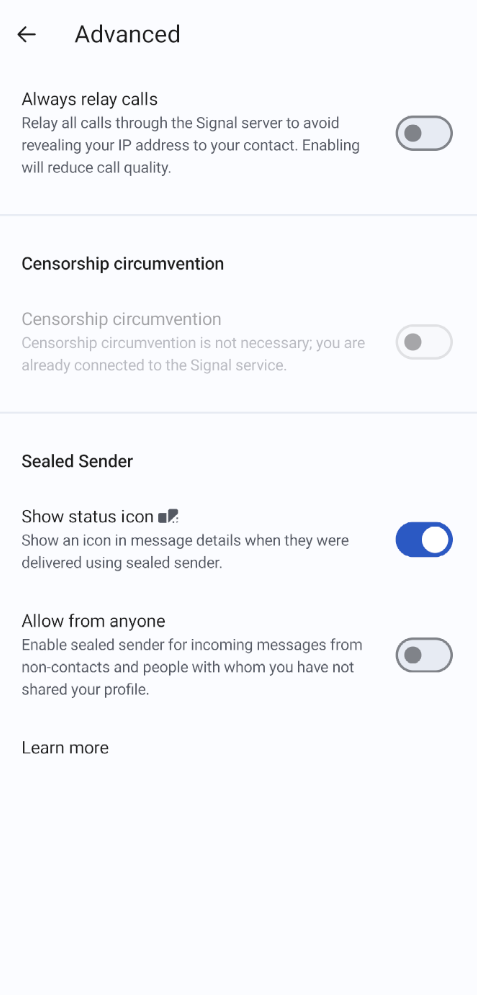
You can learn more about Signal’s “sealed sender” feature in the official blog post.
If you’re interested in the technical depths of this there is an edge case where a malicious Signal server could prevent you from sending “sealed sender” message by returning a 401 error to your request which would lead to your message being sent in a traditional way that would reveal the sender. You can read the discussion on this case on Github where Signal’s developers explain the reasoning behind it. The risk is further mitigated by the sealed sender indicators that let users check if the feature has been used.
Do you ever share a link with your friends, family, or colleagues? For example, to a website, online document, photo album, or online meeting? If so, be careful when doing this via any app other than Signal. Some apps can actually see and track which links you share and when you share them just via link previews.
First, a quick explanation: What are link previews? Link previews are small previews of websites you see when sharing a link with someone. Instead of only seeing the URL you and the recipient also see a thumbnail image, the title and a summary of the website. Such link previews make links look more informative and visually appealing.
What most people don’t realize is that some apps can see which links are being shared, who is sharing them, and when — all via link previews. This is possible even if the app uses end-to-end encryption. The good news first: Signal can’t see anything.
In Signal link previews are generated entirely locally on your device (your phone, computer, etc.). The app detects a URL in the message field via the “https://” in the text and fetches the website’s HTML from your own device. Using meta tags like title, description, and image file, the app generates a link preview. This is then end-to-end encrypted and sent to the recipient along with your message. Because of this, Signal can’t see or track which links you share.
However, the website you’re sharing can see the request to download its HTML and image files. But since you’ve probably visited and trust the website already, the privacy and security risks are relatively low. Still, this was enough reason for Signal to make link previews optional. You can turn link previews on or off in Signal’s settings. If you turn them off, you’ll just send the URL as plain text.
Oftentimes a picture says more than a thousand words and that is probably one reason why people love to send small images and GIFs instead of simple text messages. Signal understands this and has often said that it doesn’t believe that privacy is about austerity. Communication should be expressive and fun so Signal provides all the fun little features that people know from modern messaging apps such as emojis, stickers and animated GIFs. But there’s one big difference: As everything at Signal even these small features are developed with the highest level of security and privacy in mind.
For a secure and private GIF search Signal has come up with a clever solution. Let’s say you want to show your friend how happy you are and send him a GIF of a happy face. You open the GIF search in the message window of Signal and search for “happy”. In many other insecure messaging apps your search request would be seen by the GIF provider (such as GIPHY) and the messaging app service as well. Signal avoids this privacy problem by hiding this important meta data. When you search for a GIF in Signal the Signal service knows that you’re searching for a GIF, but not what you’re searching for or what you are selecting. The GIF provider sees the search term, but not who you are.
The technical details behind this are pretty straight forward. Here is how the process works:
Since Signal server’s act as intermediary for the GIF search requests and all the traffic is encrypted so neither Signal nor the GIF provider can collect any private information. Signal goes even a step further to obfuscate the network traffic using a process called “padding” that prevents possible attacks that would look at the size of the files being transferred. If you’re interested look at the technical details below or read the blog post.
Padding is a common technique in cryptography that adds random data to the message that needs to be transferred in order to make it harder for attackers to break the encryption. For the GIF search Signal uses this technique slightly different.
Consider that a malicious actor at the Signal server could watch the encrypted traffic between you and GIPHY. He couldn’t say directly what you are searching for or which GIF you’re downloading because the traffic is encrypted. But still they could see how much data you’re downloading from GIPHY and since all GIFs have different file sizes he might get a very good understanding of what GIF you have actually downloaded. Put very simply: Let’s say the attacker sees that you’re downloading some encrypted data that has the exact size of 1.46829 megabytes from GIPHY. They could then search the database of GIPHY and if they find just one file with that exact filesize they would know that this GIF was downloaded and sent by you.
To obsufcate the exact file size your Signal app will download the GIF file in separate blocks which are overlapping. In other words, your Signal client will download parts of the GIF file multiple times and will keep track which parts are which and which ones have been downloaded already.
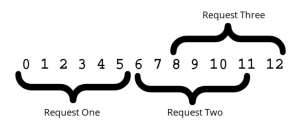
From these separate blocks your local Signal app will then generate the GIF file again, encrypt it and send it to your friend. But for an attacker observing the traffic and looking for file sizes this process will make it very very hard to guess which GIF you’ve downloaded. Because while the filesize of the GIF would still be 1.46829 megabytes your Signal app has actually downloaded 1.87421 megabytes and just dropped the unnecessary duplicate bytes.
This is a very good demonstration of how much Signal cares about privacy and security and implements even the smallest features in the best-protected way so they are hardened against all possible attacks.
Signal offers two ways to store and backup your data.
These backups are encrypted and secured with a 64 character recovery key that is needed in order to decrypt and restore a backup (earlier local backups in Signal Android had a different key but in 2026 Signal has begun to move to one unified key both for local and remote backups).
The key is only stored on your device so it is important to keep it safe. Since Signal doesn’t know your key and has no access to your backups you won’t be able to restore your data if you loose your recovery key. You can view and change this recovery key in your Signal settings.
As Signal’s support page puts it: “Each Signal one-to-one chat has a unique safety number that allows you to verify the security of your messages and calls with specific contacts.” In other words, by using and verifying a safety number you can make sure that you are actually chatting with the person you think you’re chatting with and that no one is eavesdropping on this connection.
The safety number itself is a 60-digit number that is derived from the encryption keys that you and your contact are using. To verify the safety number securely you have to use a different channel. The easiest way is to compare the safety number by scanning your contact’s QR code (ideally in person).
You can also visually or audibly compare the numeric code, or use the share icon to copy it to your clipboard to use on another channel. If the safety number is identical then you can be sure that you are communicating with the right person.
Once you are sure that you are actually talking to the right person you can mark the safety number as verified in Signal, by clicking on the contact, then “View safety number” and then “Mark as verified”. A checkmark will appear in the chat header next to your contact’s name when the safety number is marked as verified.
Signal lets you know in the chat window when a safety number with a contact has changed. This allows you to check the privacy of your communication with your contact.
The most common scenarios where a safety number notice is displayed are when a contact switches to a new phone or re-installs Signal (note that these actions don’t always result in a safety number change, for details see this article). However, if a safety number changes frequently or unexpectedly it may be a sign that something is wrong and you should check with your contact on another trusted channel if everything is correct.
The safety number of a conversation is essentially a nicely formated hash of the identity keys of the two communications partners. Or as the specification for Signal’s X3DH Key Agreement Protocol defines it (where AD means “associated data” that contains identity information for both parties).
AD = Encode(IKA) || Encode(IKB)
As you can see the safety number is a function that creates a combined and easy-to-read hash of the two identity keys of the communication partners. Since these identity keys change every time a Signal user gets a new phone or reinstalls the app (depending on how this is done, see this article) the safety number also changes. You can learn more about the technical details in Signal’s official blog post on safety numbers.
The Signal PIN is an important security feature of Signal that many users know from the small message that regularly pops up in the app to remind users of their PIN. The first important thing to know here is that the Signal PIN is not the same as your phone’s PIN that you use to unlock your phone. Instead the Signal PIN is a numeric or alphanumeric code used to help you recover your profile, settings, contacts, and block list if you ever lose or switch devices. But it also is a part of other security features as well.
First and foremost the Signal PIN was introduced for Secure Value Recovery which keeps your contacts unknown to Signal servers. As we have seen the PIN is used in a two-layer security scheme: Firstly, your contact list is encrypted with a PIN that you can choose and that remains unknown to Signal. Secondly, your contact list is encrypted with an additional key in a secure SGX enclave.
Additionally your Signal PIN is also used for enabling a registration lock as discussed in the next section.
The Signal PIN must be at least 4 digits long but for a higher level of security a longer PIN (that also includes letters and special characters) is recommended. It is also vital that you don’t share your Signal PIN with anybody, especially if you receive fake phishing messages in Signal that might ask for it.
If you don’t want to use the Signal PIN you can deactivate this feature in: Einstelllungen – Konto – Erweiterte PIN Einstellungen – PIN deaktivieren.. However, disabling this also leads to less convenience as mentioned before and you won’t be able to restore your contact list if your phone is damaged or use the registration lock. You can also disable the PIN reminders in Signal if you’re sure that you won’t forget your PIN (ideally you store it in a secure password manager) in Signal Settings – Account – PIN reminders.
You can also find more information about Signal PIN at this auf dieser offiziellen Support-Seite.
Registration lock is a very useful security feature in Signal that builds on Signal PIN. It protects your account from being taken over by an attacker if the attackers gains access to your phone number.
If you’ve set a Signal PIN you can activate this feature in Signal Settings – Account. If you have the registration lock enabled you will need to enter your Signal PIN if you want to register a new Signal account with your phone number again.
If you forget your PIN you will need to wait 7 days until you can re-register with your phone number again. After 7 days a new PIN can be created and you can register again. The old PIN and information associated with it (your contact list and profile) are no longer available.
Let’s look at the feature more closely by going through a quick example: Imagine that you’ve lost your phone and need to re-register at Signal with your old phone number. To do so you can either provide your Signal PIN to prove that you actually have been the owner of the Signal account associated with your phone number. Or if you don’t know your Signal PIN anymore you still can re-register. But in that case you will have to wait for 7 days and you will have to create a new account from scratch (without your old contact list and profile information).
Now imagine the same example from an attacker’s perspective. Imagine an attacker tries to register a Signal account with your phone number to take over your Signal account. Imagine they’ve tricked you to send them the SMS verification code (via a phishing message) and now they try to register with your phone number. If registration lock is activated Signal will ask the attacker for your Signal PIN. Since the attacker doesn’t have that information they can’t register your number.
But since they had the correct verification code you will be un-registered as well and now you have 7 days to register again. Only if you don’t re-register in these 7 days (which you normally would, because you would instantly see in the app that you’ve been de-registered) the attacker could take over your account as a fresh and empty account (with a new verification code that will be sent to the phone number).You can find more details on how the registration lock works to protect against such phishing attempts in our article on phishing attempts on Signal.
The usefulness of this feature became apparent in summer 2022 after Twilio, the external service providers that sends Signal’s SMS verification messages, got hacked and the attackers tried to gain access to Signal accounts by accessing these verification messages. As Signal stated in the report after this attack on Twilio, all users with enable registration locks were protected against these attacks. And Signal advised its users: “To best protect your account, we strongly recommend that you enable registration lock in the app’s Settings. We created this feature to protect users against threats like the Twilio attack.”
Note that the registration lock feature is not available when you have disabled Signal’s PIN feature. You can find more details about the registration lock feature in our article on phishing attacks, on Signal’s support page und dieser official blog post.
Signal is censored in some countries because the messenger enables secure and private communication through its strong end-to-end encryption. Authoritarian governments see this as a threat since they cannot monitor or control the data traffic. This censorship is not aimed at illegal content but rather at the very principle of free and protected communication.
Censorship circumvention is a technique that allows users to bypass these restrictions. Specifically, when Signal is blocked in a country, the app can use alternative routes to still connect to the Signal servers. You can then activate censorship circumvention in Signal settings – Privacy.
If the app finds a successful unblocked alternative route, Signal will function as usual. If not, a proxy server can be set manually. You can find out more information on Signal’s official support page or in this blog post. If you want to help people in authoritarian states you can learn more about how to set up and share a Signal proxy on this github page.
You can also find out more in this article.
If you are having an audio or video call with a communication partner and you want to hide your IP address from them you can activate the option “Always relay calls” in Signal settings – Privacy – Advanced. This will relay the call through Signal servers so your communication partner will only see the IP address of Signal’s servers. Note that this can significantly decrease the audio or video quality of your calls and you should enable this feature only if needed.
“Screen lock” and “screen security” are two small security features of Signal that have a similar name but do different things. Screen lock adds another security layer to Signal by requiring the authentication mechanism that you use to unlock your phone (such as you phone’s pin, fingerprint, FaceID, …) when opening Signal.
You can enable the feature in Signal Settings – Privacy. You can also set a screen lock timer that indicates when the screen lock will be activated. Android users can also manually activate the screen lock by swiping down from the top of their screen.
You can find out more about this feature on Signal’s official support page.
Bildschirmsicherheit prevents Signal previews from appearing in the app switcher on your phone and protects against screenshots as far as possible. The feature looks differently on all three platforms that Signal supports (Android, iOS, Desktop). In Android you can activate the feature in Signal Settings – Privacy and will also prevent screenshots of Signal on your own Android device. In iOS the setting can be found in Signal Settings – Hide Screen in App Switcher and will hide the Signal window content in the app switcher.
For Windows Signal has introduced a dedicated screen security feature in 2025 to protect against automatic screenshots by Microsoft Recall as described in this blog post. You can find this setting in Signal Settings – Privacy (Windows only).
More general information on screen security can be found on Signal’s official support page.
Disappearing messages is a very straightforward feature of Signal and does what you would expect: You can set a default timer for all you chats or separate timers for single chats. If a message is older than the timer you have set the message will disappear from your devices and that of your communication partners after the timer has elapsed.
Note that this feature is not intended for situations where your contact is your adversary. After all, if someone who receives a disappearing message and really wants a record of it, they can always use another camera to take a photo of the screen before the message disappears or copy the message manually.
You can set a default timer for all your chats in Signal Settings – Privacy – Disappearing Messages or for single or group chat (and also the Note to Self chat) in the chat settings. The timer can range from anything between 1 second to 4 weeks.
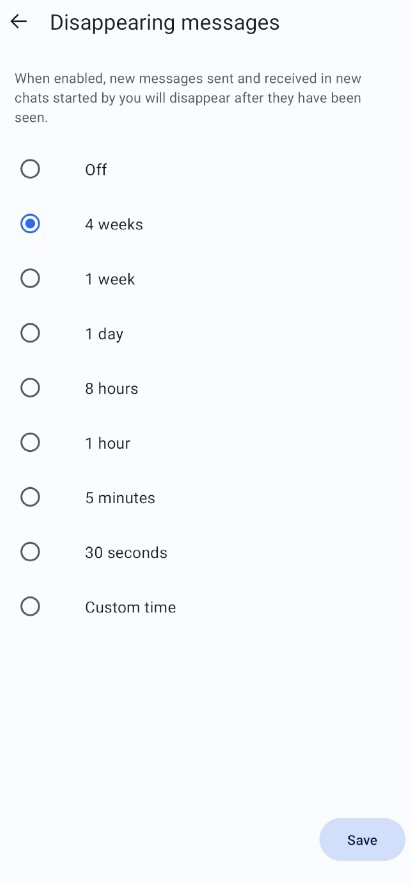
There are three specifics about disappearing messages that you should know and that are also stated on Signal’s official support page:
For a disappearing message that you send the timer starts right after you’ve sent it. For a disappearing message that you receive, the timer starts after you’ve read it. More information on disappearing messages and how to manage them can be found on Signal’s official support page. You can also read Signal’s announcement of the feature from 2021.
Note that this feature, similar to disappearing messages, is not a “real” security feature that cannot protect you from an malicious recipient that wants to record the view-once image or video nevertheless by making a screenshot or using an external camera.
If you send a view-once image/video you won’t be able to open the message anymore after it’s been sent. Instead the message will be replaced with a view-once media icon. The photo or video also won’t be stored in your Signal conversation history.
If you receive a view-once image/video you will only be able to view the media item once. And if you don’t open the message for 45 days it will be deleted automatically as well.
You can find more information about Signal’s view-once media feature on the auf dieser offiziellen Support-Seite or in this official blog post.
When you type in messages Signal uses the existing keyboard of your OS. On some Android devices, you can turn on a security feature called “Incognito Keyboard” to enable an optional keyboard privacy flag that is provided by the Android operating system. After applying this setting everything you’re typing in Signal should not become part of your typing history and personalized language model (used for autocomplete or suggestions).
Please note that this setting is a best effort and not a guarantee and that neither Signal nor Android can fully guarantee that this setting will be respected by your Input Method Editor (IME).
You can activate this feature in Signal Settings – Privacy.
As this long list has shown security and privacy are really at the core of everything that Signal does. Whether it’s high-level protection through secure end-to-end encryption and post-quantum cryptography, hiding and securing all kinds of sensible meta data or fine-grained and thought-through security features that let you choose your own personal level of security. On each of these levels Signal goes to great lengths to collect as little data as necessary and to make the app as secure as possible. Of course this is a process that never ends so we can expect additional features and updates in the future as the challenges to free communication and privacy constantly evolve.
If you want to support Signal’s pioneering work on digital security and privacy consider donating to the non-profit foundation that builds and runs Signal. You can donate directly in your Signal app by going to Signal Settings – Donate or you can visit https://signal.org/donate/
If you’re interested in how Signal’s cryptography works you might also be interested in the following resources:
How Signal Instant Messaging Protocol Works – Computerphile
Letzte News.
A closer look at the experimental features being tested in Signal Labs.
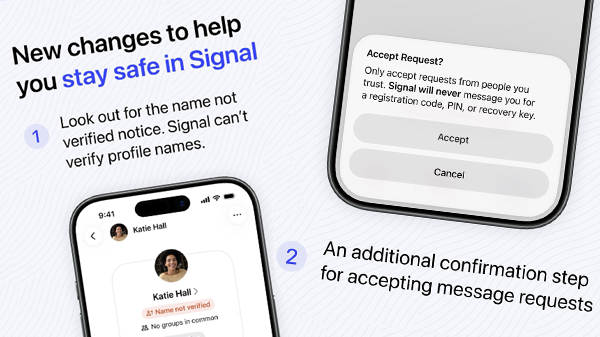
Weitere Änderungen sind in Arbeit.
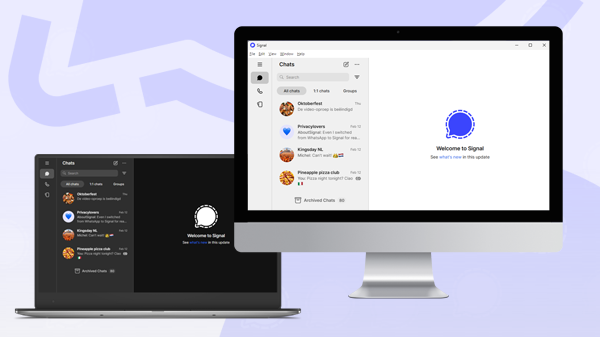
Signal arbeitet an einer eigenständigen Version seiner Desktop-App sowie an mehr anpassbaren Optionen für Signal Desktop.