Last updated: October 10, 2026 (availability updated)
Signal has added a number of new settings that give you more control over your notifications. You can adjust the settings for all chats, or per chat or group.
Signal has added While muted, Unread reminders, and Reaction notifications to its settings:
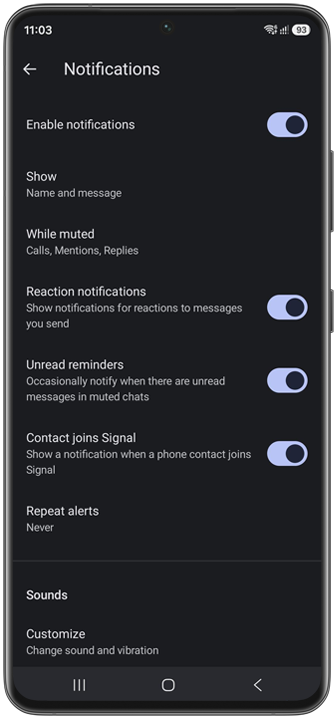
While muted
With the While muted option, you can choose to receive notifications for calls, mentions, or replies, even when chats or groups are muted. This is useful for busy chats, where you may still want to be notified about important interactions with your messages without receiving notifications for every new message.
Unread reminders
With Unread reminders, Signal will occasionally notify you when there are unread messages in muted chats. This can be useful if you want to keep chats muted but still be reminded to check messages you haven’t read yet.
According to a Signal developer on the Community Forum, Signal basically sends a notification every three days for unread messages that are at least three days old in muted chats, provided that there have been new messages since the last time Signal sent a notification.
Reaction notifications
Signal also lets you choose whether to receive notifications for emoji reactions to messages you send. This can be useful if you want to reduce notifications and don’t need to be notified every time someone reacts to one of your messages.
Signal Desktop app badge
For Signal Desktop, Signal added notification preferences for muted chats, reaction notifications, unread reminders and a new setting for the app badge. You can now choose whether the badge count displays the number of unread messages or the number of unread chats.
Reset notification settings
If you want to reset all your notification settings to their defaults, including custom settings for chats, you can now reset notification settings as well via Signal Settings > Notifications.
Availability
The new notification settings are available in Signal Android 8.26, Signal iOS 8.33 and Signal Desktop 8.27.
Stay Informed
Want to stay up to date with the latest Signal news, tips, and updates? Follow us on Bluesky or Mastodon.