Signal has introduced a new option that allows group admins to end a group chat for all members. The feature gives admins more control over managing groups.
We discovered the first signs that admins would be able to end groups for everyone in the app’s source code last February, and the feature is now rolling out.
Until now, admins had limited options when they wanted to close a group. They could remove members individually, leave the group themselves, or transfer admin rights to another member. However, there was no way to permanently end a group for all participants.
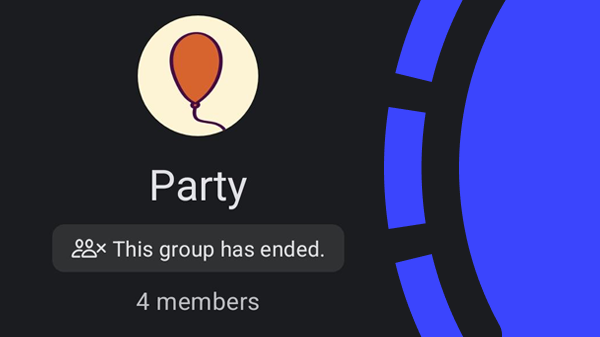
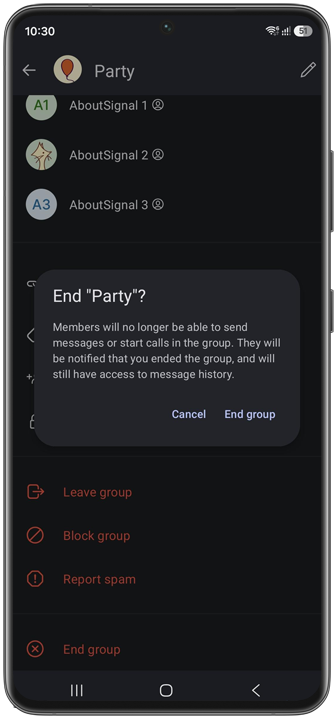
With the new feature, admins can permanently end groups. When an admin ends a group, all members will see a notification indicating that the group was ended by an administrator. Members will no longer be able to send messages or start calls in the group. However, they will still have access to the message history after the group has been ended and can view the group’s former members in the group settings.
If the group had a group link enabled for inviting people, that link will no longer be available after the group has been ended.
How ending groups in Signal works
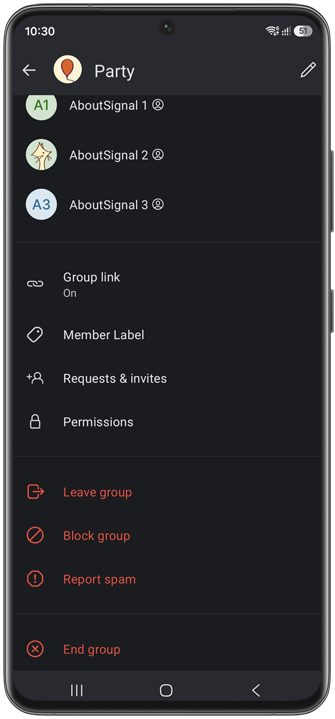
To end a group, go to group settings and tap or click on “End group”. After confirming, the group will be permanently closed and no longer available for members to use:
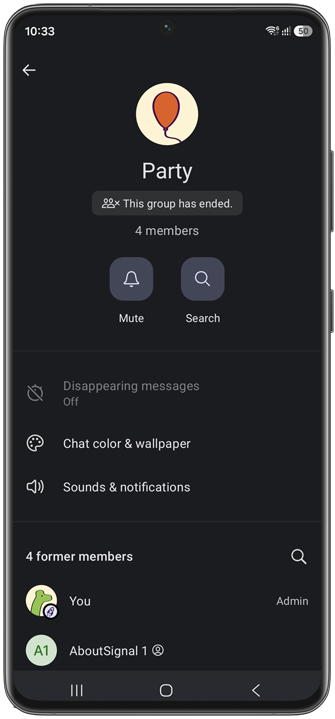
After ending a group, members will see a notification in the chat that an admin has ended the group, along with a banner at the bottom saying “You can’t send messages because the group has ended”. In group settings, members will see a message stating “This group has ended” and a list of “former members”:
The feature gives Signal group admins more control over managing groups that are no longer active. The option for admins to end groups is included in the latest beta versions (Android 8.19, iOS 8.20, Desktop 8.19) and will be available to everyone soon. Stable versions of Signal already support the ending of groups.
More group improvements
Recently Signal also introduced the option for admins to delete recent messages from other group members for everyone.
Together with the ability to end groups, these new admin controls give group administrators more ways to manage conversations.
Is your group still on another platform? Ask the group members to download Signal and move your conversations to Signal. Not to end the group, of course, but to keep it private and secure.
Stay Informed
Want to stay up to date with the latest Signal news, tips, and updates? Follow us on Bluesky or Mastodon.