Signal has introduced a new option to group calls. In the latest versions for Android, iOS and Desktop, you can now mute other participants in calls, a feature we mentioned earlier in our anteprima di Signal nel 2026.
When you mute someone, no one in the call can hear that person. This is useful, for example, if someone talks for too long, if you want to jump in briefly, or to mute someone who does not realize their microphone is on.
In a previous beta version only admins were able to mute other participants, but from now on everyone can mute other participants.
How to mute someone in a Signal group call?
To mute someone during a call, long-press their video and select Mute Audio from the menu. On Signal Desktop, hover over their video to display the menu (down-arrow icon) in the top-left corner of the video, then select Mute Audio.
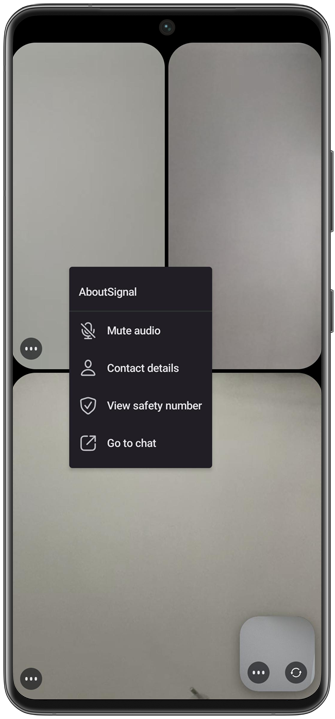
You can also mute someone from the participants list. In a group call, tap the Info icon, or on Desktop click the participant count to open the participants list. Then on Android, long-press the participant’s name and select Mute Audio. On iOS and Desktop, tap … next to the participant’s name and select Mute Audio.
When muted, a participant cannot be heard by anyone else in the call. The muted participant can unmute themselves at any time by tapping the microphone icon and turning it on again.
Disponibilità
The new feature is available in the latest versions of Signal for Android (8.15), iOS (8.16) and Desktop (8.15).
Resta informato
Vuoi rimanere aggiornato sulle ultime novità Signal notizie, suggerimenti e aggiornamenti? Seguici su Threads, Bluesky o Mastodon.